We have all been there: the year is almost over, the fridge calendar is full of crossed-out dates, and you need something printable before December is gone. Below we compare two editable monthly templates from our own library with three ready-made calendar sites, so you can decide whether you want to fill in your own month or download a 2026 calendar with holidays already marked. It's written for households, students, teachers and small offices printing at home.
Comparison at a glance
| Entry | Format | Pre-dated 2026 with holidays | Editable | Best for |
|---|---|---|---|---|
| Free Monthly Schedule Templates | MS Word (.docx) | No | Yes, in Word | Your own monthly grid |
| Free Monthly To-Do List Templates | MS Word and Excel | No | Yes, in Word or Excel | Tasks by month |
| General Blue 2026 yearly calendar | PDF, Word, Excel | Dated 2026; holidays not stated | Yes | One-page year view |
| Wiki Calendar 2026 calendar | PDF, PNG | Yes, US federal holidays | No | Holiday reference |
| Free-Printable-Calendar.com editable calendar | Browser, print or PDF | Not stated | Yes, in browser | Typing events online |
1. Free Monthly Schedule Templates (Word)
See Free Monthly Schedule Templates →
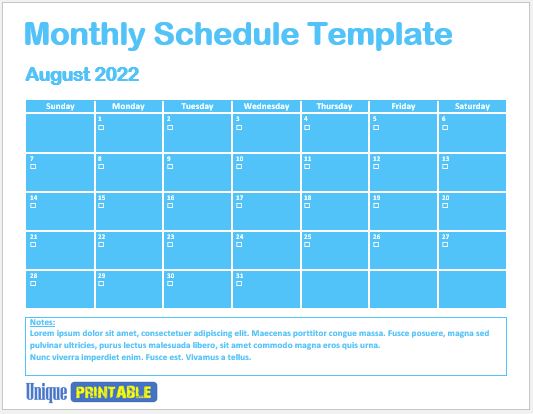
This pack gives you ten monthly schedule layouts in MS Word. The one most people will reach for is the simple monthly calendar grid, with a writing box in each day, which is easy to pin on a wall where the whole household can see it. Next to it sits a blank undated grid, with the month and dates left empty, so one print run can cover a whole year.
Because every layout is editable, you can change the month, time slots and row labels before printing. The other layouts go further than a plain calendar. You get an hourly time-slot version, a staff shift roster, a week-by-week planner, an appointment schedule, a class and study schedule, a goals and checkbox layout, a one-month project timeline with Gantt-style bars, and a maintenance and chore schedule. If you run a small team, a salon or a classroom, one of these probably fits better than a standard grid.
Keep in mind that this is not a pre-dated 2026 calendar. You set the dates and add any holidays yourself.
Best for: People who want an editable monthly grid for events, shifts or appointments
Pros
- Includes a simple monthly calendar grid with a writing box per day, plus a blank undated version you can print twelve times
- Editable in MS Word: change the month, time slots and row labels before printing
- Other layouts cover hourly slots, staff shift rosters, appointments and project timelines
- Free for personal or business use, though it states the templates cannot be resold
Cons
- Word (.docx) only; no Excel or PDF version is shown
- Dates and US holidays are not pre-filled, so you add them yourself
2. Free Monthly To-Do List Templates (Word and Excel)
See Free Monthly To-Do List Templates →
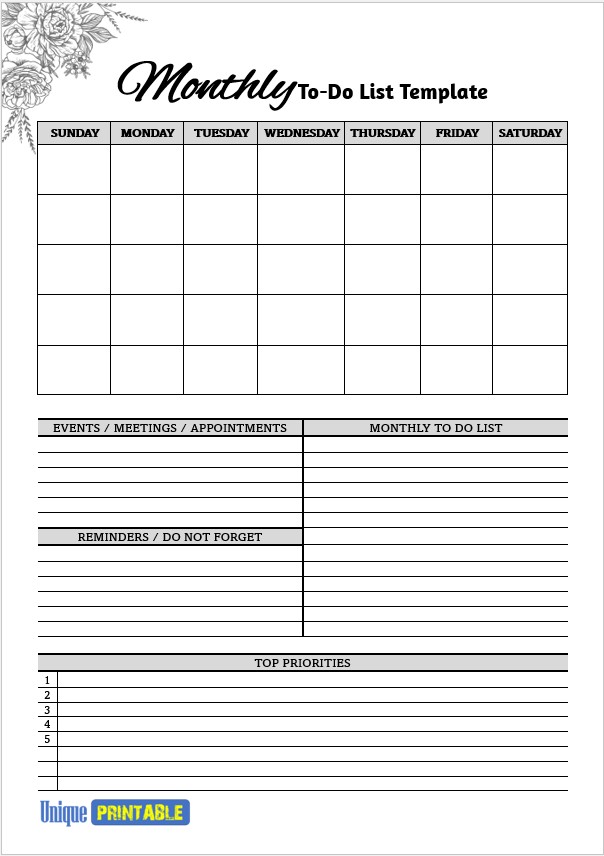
If your month is really a list of jobs, these nine monthly layouts in Word and Excel will suit you better. There is one calendar-grid monthly planner with room for a task or two in each day box. The rest are list and tracker formats: a simple checklist, an Eisenhower priority matrix, a goal-oriented list, a habit tracker with 31 daily boxes, a week-by-week breakdown, a categorised work, home and personal list, and an undated blank list you can print twelve times.
The deadline and status layout, with task, deadline, owner and status columns, is the Excel one. It's handy when someone else needs to see your progress. You can edit the month, category labels and number of rows in all of them. The page gives A4 as the default paper size, which matters if you print on US Letter.
Best for: Anyone who wants tasks laid out by month, with a calendar-grid option
Pros
- Offers a calendar-grid monthly planner with day boxes, plus a habit tracker with 31 daily boxes
- Comes in Word and Excel; the deadline and status layout is the Excel one
- Includes a priority matrix and an undated blank list for printing twelve at once
- Editable month, category labels and row count; the page states A4 as the default paper size
Cons
- Only one layout is a true calendar grid; the rest are lists and trackers
- Default paper is A4, so US Letter users may need to adjust the print settings
3. General Blue 2026 yearly calendar
General Blue offers a one-page 2026 yearly calendar that you can download free as PDF, Word or Excel. Its page describes the calendar as editable and customizable. That makes it one of the few ready-made 2026 options you can open in the same programs you already use for our templates.
You can choose a Sunday-start or a Monday-start version, so it works whichever way you like your weeks to run. You can find it on the General Blue 2026 yearly calendar page. Because the whole year sits on one sheet, it works best as an overview next to a monthly planner, not as a place to write daily notes.
Best for: Searchers who want a one-page 2026 year calendar in Word or Excel
Pros
- Free to download as PDF, Word or Excel
- Sunday-start and Monday-start versions
- Described as editable and customizable
Cons
- A yearly overview, so there is little room for writing daily details
4. Wiki Calendar 2026 calendar
Wiki Calendar is the pick when holidays matter most. Its 2026 calendars come as PDF or PNG files in landscape or portrait, and the site says no registration is needed and there are no hidden fees. It lists eleven US federal holidays for 2026, including Presidents' Day on February 16 and Juneteenth on June 19. It also points out that Independence Day 2026 falls on a Saturday, so federal employees observe it on Friday, July 3.
The site says its holiday dates are checked against the Office of Personnel Management's federal holiday schedule. You should still confirm dates with an official source before relying on them for pay or banking. You'll find it on the Wiki Calendar 2026 calendar page.
Best for: Anyone who needs a 2026 calendar with US federal holidays
Pros
- Landscape or portrait orientation
- Lists eleven US federal holidays for 2026 and says it needs no registration or hidden fees
- Says its holiday dates are checked against the Office of Personnel Management schedule
Cons
- PDF and PNG only, so you cannot type into it
- Confirm dates with an official source before relying on them for pay or banking
5. Free-Printable-Calendar.com editable calendar
If you would rather skip Word altogether, this browser editor lets you type birthdays, shifts or appointments straight into the days, then print or save as PDF. The site says nothing needs installing or signing up for. You can try it on the Free-Printable-Calendar.com editable calendar.
According to Free-Printable-Calendar.com, every calendar on the site is free for personal, school and office use, with no sign-up, no email and no watermark. Its PDFs are made for US Letter or A4, it has Monday-start layouts, and many layouts show US holidays. Its home page already lists 2027 calendars alongside November and December 2026, so check the year before you print.
Best for: Typing events into a calendar in your browser, then printing
Pros
- Says every calendar is free for personal, school and office use, with no sign-up, email or watermark
- PDFs made for US Letter or A4
- Offers Monday-start layouts and many layouts with US holidays
Cons
- Its home page already lists 2027 calendars, so make sure you pick the right year
How to choose
Start with how you actually plan:
- You want to write your own dates and events. Use the Word monthly schedule grid or the blank undated version.
- You want your tasks laid out by month. Pick the monthly to-do templates, in Word or Excel.
- You want holidays already printed. Wiki Calendar and Free-Printable-Calendar.com show US holidays.
- You want to type into a ready-made 2026 file. General Blue offers Word and Excel, and Free-Printable-Calendar.com has a browser editor.
Plenty of people use two of these together: a holiday calendar for reference and an editable monthly grid for the real detail.
Printing tips and the year
Check the paper size first. The monthly to-do templates default to A4, so switch to US Letter in your print settings if that's what is in your tray. Free-Printable-Calendar.com says its PDFs are made for US Letter or A4 and suggests the "Fit to page" option for other sizes.
Check the year on every file. With 2026 nearly over, some pages already list 2027 calendars. Look at the header before you print a stack. The undated grids from our library avoid this problem entirely.
Check the license. Our monthly schedule templates are free to use personally or in business but cannot be resold. Vertex42, another popular source, lets you print any number of copies free, provided the links and copyright notices stay on its files.
Common questions
Is the blank grid reusable?
Yes. The undated Word grid is made to be printed twelve times, and you write the dates in as each month starts.
Can I get a weekly view?
The Word monthly pack includes a week-by-week planner layout. For more options, browse our printable schedule templates, which include daily, weekly and hourly layouts.
Do the templates include holidays?
The monthly templates here are not shown with holidays. Add your own, or pair them with one of the calendar sites above.
Ready to plan the rest of 2026 and get set for next year? Pick the layout that matches how you work, then explore more free Word and Excel templates at Word Excel Templates.