We have all been there: the first of the month arrives with a surge of ambition, only for the third week to hit and leave us wondering where the time went and why our most important projects are still untouched. The gap between ambition and execution is usually a lack of a structured system. This is where a monthly ToDo list template becomes more than just a piece of paper or a digital sheet—it becomes your strategic roadmap. By shifting your focus from chaotic daily firefighting to a bird’s-eye view of your obligations, you can transform your workflow from reactive to proactive, ensuring that your long-term goals aren’t sacrificed for short-term urgency.
The Strategic Value of a Monthly ToDo List Template: Why It Matters
Most people rely on daily lists, but daily lists are often traps. They encourage “micro-productivity”—the act of completing small, easy tasks to feel a sense of accomplishment while the “big rocks” of your life and career remain unmoved. A monthly ToDo list template solves this by introducing a layer of intentionality and temporal awareness.
The hidden value of utilizing a monthly framework lies in cognitive offloading. When you externalize your entire month’s requirements into a structured template, you free up mental bandwidth. Instead of spending energy trying to remember that “something needs to happen by the 15th,” your brain can focus entirely on the execution of the task at hand. This reduction in mental clutter directly correlates to lower stress levels and higher quality output.
Furthermore, a monthly system provides an essential audit trail of productivity. Without a template, success is anecdotal; with one, it is data-driven. You can look back at previous months to identify patterns—such as which weeks are consistently overloaded or which types of tasks you habitually procrastinate on. The risk of ignoring this structured approach is “productivity drift,” where you spend 30 days being busy without actually being effective, eventually leading to burnout and missed deadlines.
Anatomy of a Perfect Monthly Todo List Template
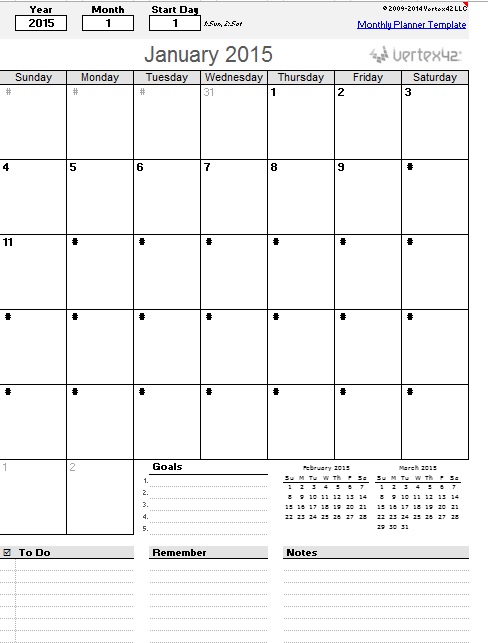
Not all lists are created equal. A scrap of paper with ten bullets is a shopping list; a professional monthly ToDo list template is a productivity system. To maximize efficiency, your template should be divided into the following critical components:
- The Monthly North Star (Primary Goal): A prominent section at the top for 1–3 non-negotiable objectives. If everything else fails, these are the tasks that define the month as a success.
- Categorized Task Buckets: Rather than one long list, divide tasks by domain (e.g., Work, Personal, Health, Finance). This prevents “context switching” fatigue.
- Priority Matrix (High, Medium, Low): A column or color-coding system to distinguish between urgent tasks and high-value tasks.
- Due Date/Deadline Column: A specific field for dates to prevent the “some time this month” fallacy, which often leads to last-minute rushes.
- The “Waiting On” Section: A dedicated space for tasks that are paused pending a response from someone else. This ensures nothing falls through the cracks.
- Weekly Milestone Markers: Visual dividers that break the month into four distinct phases, allowing you to distribute the workload evenly.
- Completion Checkboxes: The psychological reward of a checkmark is a powerful dopamine trigger that encourages continued momentum.
- Review/Reflection Area: A small section at the bottom for notes on what went well and what needs to be migrated to next month’s list.
Download Free Monthly Todo List Template

Step-by-Step Guide: How to Customize and Use Your Template
Having a monthly ToDo list template is only half the battle; the magic happens in the implementation. Follow this chronological workflow to ensure your template actually drives results.
Step 1: The Monthly Brain Dump (The Final Weekend of the Previous Month)
Before the new month begins, clear your mind. Write down every single obligation, idea, and chore swirling in your head. Do not worry about organization yet; simply get every “to-do” onto a raw list. This ensures that your template is comprehensive and you aren’t adding critical tasks mid-month.
Step 2: Filter and Prioritize
Transfer your brain dump into the template. Apply the 80/20 rule: identify the 20% of tasks that will yield 80% of your results. Assign these to your “North Star” section and mark them as High Priority. Be ruthless; if a task doesn’t align with your goals or obligations, delegate it or delete it.
Step 3: Temporal Distribution (Mapping the Month)
Assign tasks to specific weeks. Avoid the temptation to load the first week with everything. Spread your high-energy tasks across the month, leaving “buffer days” (usually Fridays) to catch up on overflow. This prevents the mid-month crash.
Step 4: The Weekly Sync
Every Sunday, spend 15 minutes reviewing your monthly ToDo list template. Extract the tasks for the coming week and move them into your daily planner. This creates a seamless bridge between your long-term vision and your daily actions.
Step 5: The End-of-Month Audit
On the last day of the month, highlight what was achieved and analyze what wasn’t. If a task was migrated three months in a row, it’s either not important or you are lacking the resources to complete it. Address this before starting the next cycle.
Best Practices & Common Mistakes to Avoid
To get the most out of your monthly ToDo list template, consider these professional tips:
Pro-Tip: Blend Digital and Analog. Use a digital template (like Notion, Trello, or Excel) for easy editing and archiving, but print out the final version for your physical desk. The tactile act of crossing off a task is more satisfying and keeps the goal visible.
Avoid the “Over-Scheduling” Trap: One of the most common mistakes is filling every hour of the month. Life is unpredictable. Leave 20% of your template blank to accommodate emergencies, spontaneous opportunities, or much-needed rest. An overfilled list is a recipe for guilt and failure.
Stop Using Vague Verbs: Instead of writing “Marketing” on your list, write “Draft 5 social media captions for Product X.” Specificity reduces the friction of starting a task.
Frequently Asked Questions about Monthly ToDo Lists
How is a monthly ToDo list different from a daily planner?
A daily planner is tactical—it focuses on how to spend your hours. A monthly ToDo list template is strategic—it focuses on what needs to be achieved over a 30-day period. The monthly list provides the “Big Picture,” while the daily planner manages the “Small Steps.” Using both in tandem ensures you are moving in the right direction while managing your time efficiently.
What is the best software for a digital monthly ToDo list template?
The “best” tool depends on your workflow. For those who love structure and databases, Notion is unmatched. For those who prefer visual boards and “Kanban” style movement, Trello is ideal. For those who need raw data and custom checkboxes, Google Sheets or Microsoft Excel provide the most flexibility. However, regardless of the software, the principles of prioritization and review remain the same.
What do I do with tasks that I didn’t finish by the end of the month?
Don’t simply migrate every unfinished task to the next month. This leads to a “snowball effect” where your list becomes an insurmountable mountain of guilt. Instead, evaluate each unfinished item: Is it still relevant? If yes, reschedule it. If no, delete it. If it’s too big, break it down into smaller, more manageable sub-tasks for the new monthly ToDo list template.
Can I use a monthly template for both work and personal life?
Yes, and it is highly recommended. Integrating your personal and professional obligations into one monthly ToDo list template (using separate categories) prevents scheduling conflicts. It allows you to see, for example, that a heavy work deadline in week three coincides with a family event, prompting you to move your work milestones earlier in the month.
Conclusion: Take Control of Your Calendar
Productivity isn’t about doing more things; it’s about doing the right things consistently. By implementing a structured monthly ToDo list template, you stop guessing and start executing. You move from a state of constant urgency to a state of calm, controlled progress. Download or build your template today, perform your first brain dump, and experience the clarity that comes with true organization.