Imagine you are a project manager or a legal professional who needs to verify that a specific individual was present at a mandatory meeting, a court hearing, or a corporate seminar. In these moments, a simple verbal confirmation is rarely enough; you need a formal document that serves as official proof of attendance for auditing or compliance purposes. However, drafting a professional certificate from scratch can be a tedious task that takes time away from your actual priorities. This is where a high-quality certificate of appearance template becomes an invaluable asset. By using a ready-made design, you can eliminate the stress of formatting and wording. These customizable templates allow you to maintain a professional image while streamlining your workflow, enabling you to simply download, plug in the necessary details, and print a polished document in a matter of seconds.
Understanding Certificate of Appearance Template
A Certificate of Appearance Template is a pre-designed document used to provide official proof that a specific person was physically present at a certain location or event. Instead of creating a new document from scratch, users fill in the blank sections of the template with the individual’s name, the date, and the purpose of the visit. The primary purpose of this document is to serve as a formal verification for administrative or legal records, ensuring there is a written trail of attendance.
This template is commonly used in professional settings, such as when an employee visits a government office or attends a corporate seminar to justify their time away from their desk. In educational contexts, it may be used by students attending off-campus workshops or seminars to earn credit. Even in personal situations, such as court appearances or medical appointments, these certificates act as a reliable receipt of presence to prevent disputes and confirm compliance with requirements.
Common Uses of Certificate of Appearance Template
A certificate of appearance serves as a vital piece of documentation across various professional and personal settings to prove a person was physically present at a specific location. In a corporate environment, an employee might need one after attending a regional seminar or a mandatory training workshop to justify their travel expenses and time away from their primary desk. Similarly, in the legal system, a witness or a lawyer might require a signed certification from the court clerk to prove they attended a hearing, ensuring they can provide evidence of their compliance with a subpoena. Students and researchers often utilize these forms when visiting remote archives or government libraries for fieldwork, presenting the document to their university to validate their academic progress. Beyond the office and school, individuals dealing with government agencies often need a stamped certification to prove they appeared for a scheduled appointment or a citizenship interview. Even in healthcare, a patient might request a brief certification of appearance from a specialist’s clinic to provide to their employer as a legitimate excuse for a medical absence. By using a standardized template, these institutions can quickly verify a visit, streamline administrative audits, and maintain a reliable paper trail for attendance and accountability.
Essential Components of a Certificate of Appearance
A comprehensive Certificate of Appearance must begin with a formal header and the issuing organization’s logo to immediately establish the document’s official origin and authority. The full name of the attendee is critical for precise identification, ensuring the credit is attributed to the correct individual. To provide a verifiable timeline, the exact date and duration of the appearance must be recorded, which serves as evidence that the person was physically or virtually present for the required period. A detailed description of the event or purpose, such as a court hearing or professional seminar, is necessary to give the certificate context and utility for legal or administrative audits. For maximum authenticity, the document must include the signature of the authorized official and an official seal or stamp, as these elements prevent forgery and validate the claim. Finally, a unique reference number often helps the issuing body track the record within their internal database, completing a chain of accountability that makes the certificate a reliable piece of evidence for professional or legal verification.
Different Styles of Certificate of Appearance Template
The design of a certificate of appearance often mirrors the environment in which it is issued, as the visual tone communicates the level of formality and the nature of the event. In highly official or legal settings, formal styles are the standard. These templates typically feature a minimalist layout with a heavy reliance on white space, structured borders, and traditional serif typography. The focus here is on authority and legitimacy, utilizing a monochromatic or muted color palette to ensure the document looks professional when filed in a government record or a corporate HR folder. Such designs prioritize clarity and authenticity over artistic flair, often leaving ample room for official dry seals or ink signatures.
As the context shifts toward celebratory or commemorative events, decorative styles take center stage. These templates are characterized by intricate flourishes, ornate border patterns, and a richer use of color, such as deep burgundies, navy blues, or gold foil accents. Rather than just serving as proof of presence, these certificates act as keepsakes. The typography often blends bold headings with elegant cursive scripts to create a sense of prestige. This style is ideal for seminars, gala appearances, or artistic showcases where the goal is to make the recipient feel honored and recognized for their participation.
In contrast to traditional elegance, modern styles embrace a clean, geometric, and dynamic aesthetic. These templates move away from centered layouts and ornate borders, opting instead for asymmetrical shapes, vibrant accent colors, and sans-serif fonts that evoke a sense of innovation. Modern certificates often incorporate digital elements, such as QR codes for instant verification or subtle gradient backgrounds that give the document a fresh, corporate-tech feel. This approach is frequently used for workshops, tech conferences, or creative meetups, where the objective is to align the documentation with a forward-thinking and agile brand identity. Ultimately, whether the goal is to maintain strict professionalism, celebrate an achievement, or project a cutting-edge image, the chosen style transforms a simple piece of paper into a reflection of the event’s overall spirit.
Download Free Certificate of Appearance Design
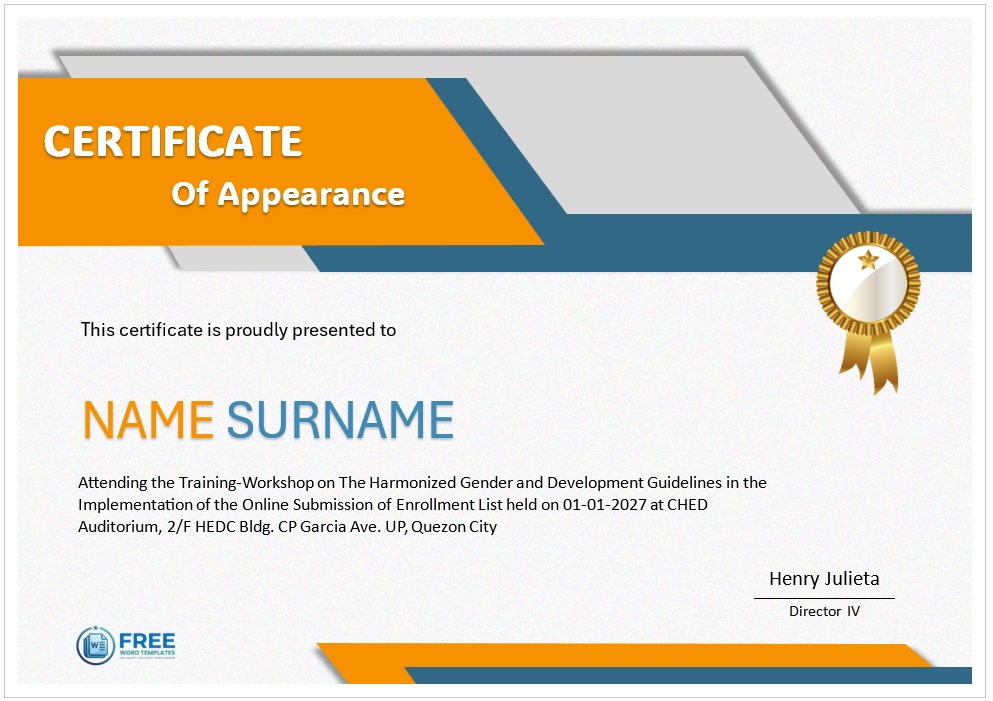

How to use Certificate of Appearance Template
To begin, find a professional Certificate of Appearance template that suits your needs and download the file to your computer. Depending on the format, you will likely open it using a word processor or a design application. Once the document is open, you will see placeholders where the essential information needs to go.
Start by updating the header and organization details. Replace the generic company name with your own and upload your official logo to give the document a professional look. Next, move to the main body of the certificate. Carefully type in the full name of the individual who attended the event or meeting, ensuring the spelling is correct. You should also fill in the specific date of appearance and the name of the event or the reason for the visit.
After the personal details are set, focus on the authorization section. Input the name and title of the presiding officer or supervisor and ensure there is a clear space provided for a handwritten signature. You can also add an official seal or stamp in the designated area to enhance the document’s validity.
Review the entire certificate for any typos or alignment issues to ensure the layout looks polished. Once you are satisfied with the result, save the file as a PDF to lock the formatting. Finally, you can print a hard copy on high-quality cardstock for a formal presentation or share the digital version via email to the recipient.
Customizing Certificate of Appearance Template
Customizing a Certificate of Appearance begins with selecting a tool that allows for flexible editing, such as a standard word processor or a web-based design editor. Once you open your template, the first step is to update the essential text. You should replace placeholder fields with the specific name of the organization, the name of the attendee, and the exact date of appearance. To make the document look professional, you can adjust the typography by choosing fonts that balance readability with a sense of formality.
Beyond text, you can refine the visual design to align with your branding. Most editors allow you to change the color scheme of borders and headers to match your corporate identity. If you have a company logo, you can simply upload the image and position it at the top or bottom of the page to ensure authenticity.
Finally, you should review the layout to ensure there is a clear flow of information. You can modify margins or adjust the spacing between the body text and the signature line to create a clean, uncluttered look. Once the design is polished, saving the file as a PDF is the best way to preserve the formatting before printing or emailing the certificate to the recipient. This practical approach ensures that every certificate is both accurate and visually appealing.
Why Use Our Templates
Streamlining your administrative tasks shouldn’t come at the expense of your professional image. Our Certificate of Appearance templates are designed to bridge the gap between efficiency and excellence, allowing you to generate official documentation in a fraction of the time. Instead of spending hours struggling with complex design software or formatting margins from scratch, you can simply download a pre-made layout and plug in your specific details.
By choosing our templates, you ensure that every document you issue carries a polished and authoritative look that instills confidence in your clients and partners. We have focused on creating a user-friendly experience that removes the technical hurdles, meaning anyone on your team can produce high-quality certificates regardless of their design skill level. This seamless integration of professional quality and effortless usability allows you to reclaim your valuable time and focus on what truly matters—growing your business and serving your clients—while we handle the aesthetics.