For many HR leaders and department managers, the process of allocating funds for employee growth feels like a guessing game. You know your team needs to evolve to keep up with industry trends, but without a structured approach, you’re often left playing “catch-up” with expenses or fighting for every penny during annual reviews. This is where a training budget template becomes an indispensable asset. Rather than a simple spreadsheet, a well-constructed template serves as a strategic roadmap, transforming “spending” into “investing.” By quantifying your L&D (Learning and Development) needs, you can ensure that every dollar spent translates into a tangible increase in organizational capability and employee retention.
The Deep Dive: Why a Structured Training Budget Template is Non-Negotiable
Many organizations make the mistake of treating training as an ad-hoc expense—approving a random course here or a certification there. However, this fragmented approach leads to “budget leak,” where funds are exhausted on low-impact workshops while critical skill gaps remain unaddressed. Utilizing a formal training budget template provides three critical advantages: fiscal accountability, strategic alignment, and psychological security.
First, accountability. When expenses are tracked against a predefined template, you can see exactly where the money is going in real-time. This prevents the end-of-quarter panic when you realize you’ve overspent on external consultants and have nothing left for essential software certifications. Second, it ensures strategic alignment. A template forces you to categorize spending—distinguishing between mandatory compliance training and optional professional development—ensuring that the business’s core operational needs are met first.
Finally, there is the element of risk mitigation. Without a documented budget, L&D initiatives are often the first to be slashed during a lean quarter. When you have a historical record of spending and a projected plan based on a template, you can present a data-driven argument to the CFO, demonstrating how a specific investment in a training budget template framework correlates with reduced employee turnover and increased productivity.
Anatomy of a Perfect Training Budget Template
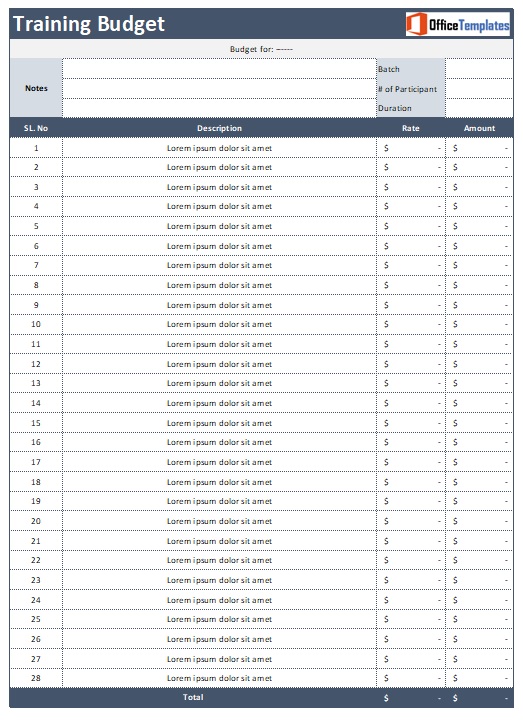
Not all spreadsheets are created equal. To move beyond basic bookkeeping and into strategic planning, your training budget template must include specific data points that allow for both granular tracking and high-level analysis. A professional-grade template should be divided into the following core components:
- Category Classification: Divide expenses into buckets such as Hard Skills (technical training), Soft Skills (leadership/communication), Compliance/Regulatory (legal requirements), and Onboarding (new hire integration).
- Delivery Method: A column to specify if the training is Instructor-Led (ILT), E-Learning/LMS, Peer-to-Peer Mentorship, or External Certification. This helps analyze which medium is most cost-effective.
- Direct Costs: This includes the obvious expenses: tuition fees, registration costs, software licenses, and trainer salaries.
- Indirect/Hidden Costs: This is where most budgets fail. Include fields for Travel and Lodging, Course Materials, and—most importantly—Opportunity Cost (the value of the employee’s time spent away from their primary duties).
- Planned vs. Actual Spend: Two parallel columns that allow you to track your variance. This is the primary tool for auditing your financial accuracy throughout the year.
- KPI/Success Metric: A section to note the expected outcome. For example: “Certification in AWS” or “10% increase in sales conversion rate.”
- Approval Status: A simple dropdown (Pending, Approved, Rejected) to maintain a clean audit trail of who authorized the expenditure.
Download Free Training Budget Template

Step-by-Step Guide: How to Customize and Use Your Template
Owning a training budget template is only half the battle; the value lies in the execution. Follow this chronological workflow to integrate the template into your corporate ecosystem:
- Perform a Skill Gap Analysis: Before touching the template, survey your team. Where are the weaknesses? What new technologies are entering your market? Your budget should be a response to these gaps, not a random set of numbers.
- Define Your Baseline: Determine your total available funds. Some companies use a “percentage of payroll” model (e.g., 1–3% of total payroll), while others set a fixed annual sum per employee. Enter this total into the “Global Budget” cell of your template.
- Allocate by Priority: Fill in your “Planned” column. Start with mandatory compliance training (non-negotiable), then move to high-impact strategic skills, and finally, individual professional development requests.
- Implement a Request Workflow: Do not allow “surprise” expenses. Create a process where employees submit a request, which you then input into the training budget template to see if funds are available before granting approval.
- Conduct Monthly Reviews: At the end of each month, update the “Actual Spend” column. Compare it to your “Planned” spend. If you are consistently under-spending in one area, you can pivot those funds to a high-demand training area.
- The Annual Post-Mortem: At year-end, analyze the “Actual Spend” vs. “KPI” columns. Did the expensive certification actually lead to the expected productivity gain? Use this data to refine the template for the following year.
Best Practices & Common Mistakes to Avoid
To get the most out of your training budget template, lean toward automation and simplicity. Avoid the temptation to create a “mega-sheet” with 50 different tabs; if a template is too complex, you will stop updating it. Instead, use conditional formatting (e.g., cells turning red when you exceed 90% of a category’s budget) to provide instant visual cues.
One common pitfall is ignoring the “hidden” costs of training. Many managers budget for the course fee but forget that the employee is not producing revenue while in the classroom. By including “Lost Productivity Hours” in your template, you get a more honest picture of the investment. Additionally, avoid “Budget Hoarding”—the practice of spending the remainder of the budget in December on unnecessary courses just to ensure the budget isn’t cut next year. This wastes capital and provides zero ROI.
Frequently Asked Questions About Training Budgeting
How do you calculate a training budget per employee?
The most common method is to determine the total annual L&D budget and divide it by the total headcount. However, a more sophisticated approach is Tiered Allocation. In this model, a training budget template assigns different amounts based on the role’s criticality or the employee’s career stage. For example, a junior developer may have a higher budget for technical certifications, while a senior manager has a higher budget for leadership coaching.
What are the most common hidden costs in corporate training?
Beyond the sticker price of the course, the most frequent “hidden” costs include travel expenses, per diems, exam retake fees, and the cost of the Learning Management System (LMS) seats. The most significant hidden cost, however, is Internal Labor. If a senior lead spends 10 hours a week mentoring juniors, those hours should be tracked within your training budget template as an internal investment.
How do I justify a training budget to senior management?
Stop talking about “learning” and start talking about “risk” and “revenue.” When presenting your training budget template, show the cost of not training. For instance, “If we don’t train our team on this new software, we risk a 20% drop in efficiency or a potential security breach.” Presenting a clear ROI (Return on Investment) or ROE (Return on Expectations) makes the budget an easy “yes” for executives.
Should training budgets be centralized or department-specific?
A hybrid approach is usually best. A centralized budget should cover company-wide compliance and core values training. However, department-specific budgets allow managers to respond quickly to technical shifts in their specific field. Use your training budget template to track both a “Core Fund” and “Departmental Allotments” to maintain a balance of consistency and flexibility.
Conclusion: Start Building Your Growth Engine
A training budget template is more than just a financial document; it is a commitment to your people and your company’s future. By moving from an ad-hoc spending habit to a structured, data-driven investment strategy, you ensure that your team remains competitive and your expenditures remain lean. Stop guessing and start planning—implement your template today and turn your workforce into your greatest competitive advantage.