Imagine you are finally planning that dream international trip or applying for a new job opportunity, only to realize that your current employer or landlord requires a formal No Objection Certificate to clear your path. Suddenly, a simple administrative requirement feels like a daunting hurdle, especially when you are staring at a blank screen, wondering which legal terms to use or how to structure the request professionally. This is where a well-crafted template becomes an absolute lifesaver, removing the guesswork and the stress of drafting a document from scratch. Instead of spending hours worrying about the formatting, you can simply use a ready-made template that ensures all the necessary details are covered. By downloading and customizing a professional layout, you can quickly generate a polished, official letter that gets your request approved without any unnecessary delays.
Understanding No Objection Certificate Template
A No Objection Certificate template is a pre-formatted document used to provide formal confirmation that an organization or individual has no objection to a specific action being taken by another party. Its primary purpose is to act as a legal clearance or permission slip, ensuring that there are no disputes or contractual conflicts regarding a request.
In a professional context, an employer might provide this certificate to an employee who wishes to apply for a new job or a visa. In educational settings, students often use these templates to get permission from their current institution to attend a seminar or transfer to another college. Additionally, it is common in personal contexts, such as when a landlord grants permission for a tenant to make modifications to a property. By using a template, the user ensures that all necessary legal details, such as dates and official signatures, are included, making the process efficient and professional for all parties involved.
Common Uses of No Objection Certificate Template
A No Objection Certificate, or NOC, serves as a vital bridge of formal consent in many everyday transitions. For instance, an employee seeking a new career opportunity or a part-time gig may need an NOC from their current employer to prove that the company has no reservations about their external professional engagements. Similarly, students often require this document when applying for visas to study abroad, ensuring their current academic institution permits them to travel and pursue degrees elsewhere. In the realm of real estate and urban living, a homeowner might need an NOC from a housing society or local municipality before initiating major renovations or transferring property ownership to a buyer. This formal approval is equally crucial in administrative shifts, such as when a professional wants to transfer their business license to a new location or when a vehicle owner moves to a different state and needs to re-register their car. Even in personal matters, such as a legal guardian permitting a minor to travel internationally, these templates provide the necessary legal clarity to prevent delays at checkpoints or government offices. By standardizing these requests, individuals can smoothly navigate the bureaucratic requirements of workplaces, educational centers, and civic authorities without facing unexpected hurdles.
Essential Components of a No Objection Certificate
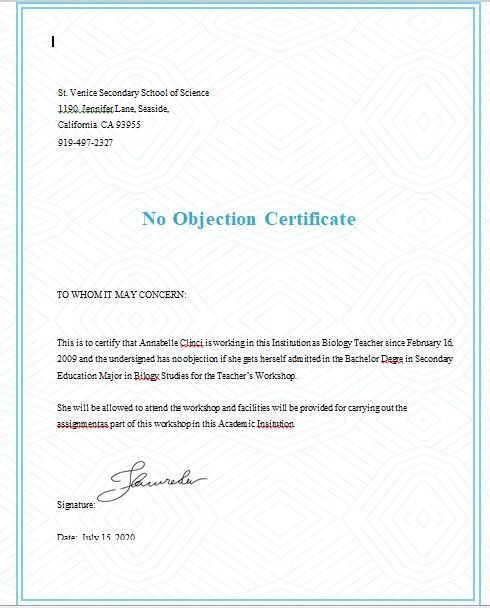
A comprehensive No Objection Certificate must begin with official letterhead and a unique reference number to establish organizational legitimacy and allow for future verification. The date of issuance is critical as it defines the document’s validity period, ensuring the permission is current. A formal salutation or a “To Whom It May Concern” statement directs the document to the appropriate authority, while the full name and identification details of the individual are necessary to prevent identity confusion. The core of the document is the explicit statement of no objection, which clearly defines the specific activity or request being approved, thereby removing legal or administrative ambiguity. To ensure authenticity, the certificate must include the name, designation, and signature of the authorized signatory, proving that the consent comes from a person with the power to grant it. Finally, an official company stamp serves as a final layer of security, validating the document as a genuine corporate record and making it useful for legal, academic, or professional transitions.
Different Styles of No Objection Certificate Template
The design and structure of a No Objection Certificate often shift to align with the specific intent of the document and the environment in which it is presented. In the most traditional sense, the formal style remains the gold standard for corporate and governmental interactions. This variation prioritizes a clean, minimalist aesthetic, typically featuring a centered header, a stark white background, and a standard serif font that conveys authority and professionalism. The layout is strictly functional, focusing on the clarity of the statement and the legitimacy of the official seal, ensuring that the document is viewed as a serious legal instrument.
As the need for a more contemporary image grows, many organizations have transitioned toward a modern style. This approach blends professional rigor with a touch of visual identity, often incorporating a subtle company color palette and a streamlined header that includes a digital logo. Rather than relying on dated borders, the modern layout utilizes ample white space and sans-serif typography to improve readability and give the certificate a polished, current feel. This style is particularly effective for tech startups or creative agencies where the goal is to maintain a formal tone without appearing overly rigid or antiquated.
In contrasting scenarios, such as community events or academic acknowledgments, a decorative style may be employed. While still serving as a legal clearance, these templates integrate ornate borders, elegant script fonts for signatures, and perhaps a light watermark or textured background. This variation transforms the document from a mere piece of paperwork into a keepsake, making it suitable for situations where the certificate is meant to be displayed or framed. The emphasis here shifts from pure utility to a blend of aesthetic appeal and official confirmation.
Ultimately, the choice between these variations depends on the relationship between the issuer and the recipient. While a government office will always lean toward the stark efficiency of the formal layout, a creative studio might opt for the sleekness of the modern format, and a cultural institution might choose the sophistication of a decorative design. Regardless of the visual approach, the core purpose remains the same: providing a clear, unambiguous statement of consent and authorization.
Download Free No Objection Certificate Template

How to use No Objection Certificate Template
Start by browsing your preferred document library and selecting a No Objection Certificate (NOC) template that fits your specific needs, whether it is for employment, travel, or property matters. Once you find the right layout, download the file to your computer in a compatible format like Word or PDF.
Open the document and begin the editing process by replacing the placeholder text with actual information. Carefully enter the current date and the full legal name of the person for whom the certificate is being issued. In the main body of the letter, clearly state the purpose of the NOC and explicitly mention that the issuing authority has no objection to the requested activity. Ensure that all professional titles, company names, and identification numbers are accurate to avoid any legal delays.
After reviewing the text for clarity and correcting any typos, move to the signature section. The document must be signed by an authorized official to be legally valid. If you are using a digital version, you can insert an electronic signature; otherwise, print the document on the official company or organizational letterhead. Finally, apply the official company stamp or seal over the signature to authenticate the document. You can now hand over the physical copy to the user or scan it to share it via email for their official application.
Customizing No Objection Certificate Template
Customizing a No Objection Certificate requires careful attention to detail to ensure the document remains professional and legally valid. To begin, users should open their chosen template in a word processor or an online document editor. The first step involves replacing all placeholder text, such as [Your Name] or [Date], with actual information. It is essential to ensure that names, employee IDs, and specific project details are accurate to avoid any administrative delays.
To modify the design and layout, users can utilize the formatting toolbar to adjust font styles and sizes. Using a clean, professional font like Arial or Times New Roman ensures readability. If the organization has a specific visual identity, users can insert a company logo at the top of the page by using the insert image function. Adjusting the page margins and alignment helps the text look balanced and official.
For those needing a more structured look, using the table tools in a word processor can help align dates and signatures neatly at the bottom of the page. Once the text and layout are finalized, it is a good practice to save the document as a PDF. This prevents any accidental changes to the formatting and ensures the recipient sees the certificate exactly as it was intended. Finalizing the document with a digital or physical signature and an official stamp completes the customization process.
Why Use Our Templates
Drafting a formal document from scratch can be a tedious and stressful process, especially when you are unsure of the exact legal or corporate phrasing required. Our No Objection Certificate templates eliminate this guesswork by providing a sophisticated framework that ensures you never miss a critical detail. By choosing our pre-designed layouts, you can transform a complex administrative task into a quick and seamless process, saving you valuable time that can be better spent on your core priorities.
Beyond mere convenience, these templates are engineered for professional quality. They adhere to standard industry formats, giving your documentation an authoritative look that inspires confidence in embassies, banks, and corporate HR departments. Instead of struggling with formatting and margins, you can simply plug in your specific details and produce a polished, error-free document in minutes. Whether you are requesting permission for travel, employment, or property transfers, our tools provide the perfect balance of simplicity and professionalism, ensuring your request is handled efficiently and without unnecessary delays.