Whether you are planning a high-stakes corporate product launch, a sprawling wedding, or a community fundraiser, there is one universal truth in event planning: costs have a tendency to balloon. Without a rigorous financial roadmap, a “small unexpected fee” here and a “last-minute upgrade” there can quickly lead to a budget deficit that jeopardizes the entire project. This is where a professional event budget template becomes your most valuable asset.
The Deep Dive: Why a Dedicated Event Budget Template is Non-Negotiable
Many novice planners make the mistake of “mental budgeting” or using simple note-taking apps to track costs. However, the complexity of event logistics—varying vendor quotes, tiered pricing, and fluctuating guest counts—requires a dedicated system. The hidden value of a structured event budget template lies in its ability to provide financial visibility and accountability.
When you utilize a standardized template, you move from reactive spending to proactive management. This shift offers several critical advantages:
- Elimination of “Budget Leakage”: Small, uncategorized expenses (like parking permits, gratuities, or extra cables) often go unnoticed but can collectively cost thousands. A template forces every cent to be categorized.
- Risk Mitigation: By building in a “contingency fund” line item, you create a financial safety net for the inevitable emergencies that occur during live events.
- Stakeholder Transparency: Whether you are reporting to a CEO or a couple getting married, a clean budget document provides an audit trail that justifies spending and proves fiscal responsibility.
- Data-Driven Decision Making: If you see that venue costs are exceeding projections, a template allows you to instantly identify where you can trim costs (e.g., reducing floral arrangements) to maintain the bottom line.
The risk of ignoring this tool is stark: overspending, vendor disputes due to payment misunderstandings, and the stress of financial chaos that can distract you from the actual guest experience.
Anatomy of a Perfect Event Budget Template
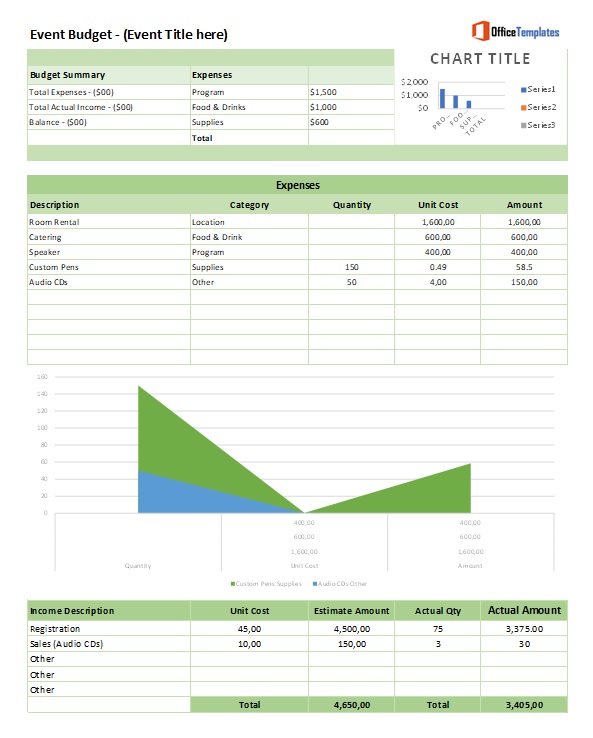
Not all spreadsheets are created equal. To truly manage your finances, your event budget template must be comprehensive, granular, and dynamic. A high-quality template should be divided into logical sections to prevent data overlap and confusion.
Here are the essential components that every professional-grade template must include:
1. The Summary Header
- Total Budget Ceiling: The absolute maximum amount available.
- Total Actual Spend: A real-time sum of all paid and committed costs.
- Remaining Balance: The difference between the ceiling and actual spend.
- Variance Percentage: A calculation showing if you are over or under budget by what percentage.
2. Expense Categories (The Core Columns)
Each line item should be categorized. Common sections include:
- Venue & Logistics: Rental fees, insurance, security, permits, and parking.
- Food & Beverage: Catering per head, appetizers, open bar costs, service charges, and taxes.
- Audio/Visual & Technology: Sound systems, projectors, Wi-Fi upgrades, lighting, and live-streaming gear.
- Marketing & Promotion: Social media ads, printed invitations, signage, and email software.
- Programming & Talent: Speaker fees, travel expenses, performer honorariums, and green-room riders.
- Decor & Aesthetics: Centerpieces, linens, stage design, and floral arrangements.
3. Tracking Metrics (The Vertical Fields)
For every single item listed above, you need the following columns to ensure accuracy:
- Estimated Cost: Your initial “best guess” or quote.
- Actual Cost: The final amount invoiced.
- Paid Amount: How much has been sent to the vendor (tracking deposits).
- Balance Due: The remaining amount owed to avoid last-minute payment panics.
- Notes/Vendor Contact: A space for contract numbers or specific terms.
Download Free Event Budget Template

Step-by-Step Guide: How to Customize and Use Your Template
Possessing a template is only half the battle; the value is in the execution. Follow this chronological workflow to maximize the utility of your event budget template.
- Phase 1: The “Wish List” (Ideation)
Before locking in numbers, list every possible requirement for your event. Don’t worry about costs yet; focus on scope. This ensures you don’t forget “invisible” items like power extensions or staff meals. - Phase 2: Establish the Baseline (Estimation)
Research average costs or request preliminary quotes. Enter these into the “Estimated Cost” column. This creates your baseline and tells you if your vision is realistic relative to your total budget ceiling. - Phase 3: The Commitment Phase (Booking)
As you sign contracts, move the “Estimated Cost” to “Actual Cost” based on the signed agreement. Record the deposit in the “Paid Amount” column immediately. - Phase 4: Weekly Reconciliation (Tracking)
Set a recurring calendar invite (e.g., every Friday) to update the template. Enter any new invoices and check for variance. If a category is trending “red” (over budget), decide then and there where to cut costs from another category. - Phase 5: Post-Event Audit (Analysis)
Once the event is over, finalize all payments and compare the initial estimates to the final totals. This data is gold for planning your next event.
Best Practices & Common Mistakes to Avoid
To get the most out of your event budget template, avoid the “set it and forget it” mentality. Here are professional tips for efficiency:
Pro-Tips for Maximum Efficiency:
- Use Cloud Collaboration: Use Google Sheets or Microsoft Excel Online. This allows multiple team members to update costs in real-time, preventing version control issues.
- Automate with Formulas: Use
SUMandVLOOKUPformulas so that updating a single vendor cost automatically updates the total budget summary. - Color Coding: Use conditional formatting. Set cells to turn red if the “Actual Cost” exceeds the “Estimated Cost.”
Pitfalls to Avoid:
- Ignoring Taxes and Gratuities: A $10,000 catering quote often becomes $12,500 after tax and a 20% service charge. Always budget for the “out-the-door” price.
- Over-Complicating the Fields: Don’t track every single paperclip. Group small items into “Miscellaneous” to avoid “spreadsheet fatigue.”
- Forgetting the Contingency: Never allocate 100% of your funds. Always leave 10–15% of your total budget as an unallocated “emergency fund.”
Frequently Asked Questions about Event Budgeting
How do I handle unexpected costs in my event budget template?
The best way to handle surprises is to include a “Contingency” line item (usually 10-15% of the total budget). When an unexpected cost arises, draw from this fund rather than dipping into another category’s allocation. If the contingency is exhausted, you must offset the new cost by reducing spending in a flexible category, such as decor or marketing.
What is the difference between a budget and a financial report?
An event budget template is a forward-looking document used for planning and projection. A financial report is a backward-looking document that summarizes what was actually spent. Your budget template serves as the blueprint, while the financial report is the record of the finished building.
Should I use a free template or build one from scratch?
For standard events, a high-quality free template is usually sufficient as it provides a proven structure. However, for highly specialized events (like multi-day festivals with complex sponsorship tiers), building a custom template allows you to track specific KPIs and revenue streams that generic templates might overlook.
How often should I update my event budget?
At a minimum, the budget should be updated weekly. However, during the “final push” (the two weeks leading up to the event), it should be updated daily as final invoices and last-minute adjustments arrive. Real-time tracking prevents “bill shock” on the day of the event.
Conclusion: Start Your Journey to Financial Clarity
Precision in planning leads to excellence in execution. By implementing a comprehensive event budget template, you remove the guesswork and anxiety from your financial management, allowing you to focus on what truly matters: the attendee experience. Don’t leave your event’s success to chance—start organizing your expenses today and ensure a profitable, stress-free celebration.