Whether you are a first-time homebuyer, a small business owner scaling operations with equipment loans, or an individual managing a personal line of credit, the complexity of interest can be daunting. When you make a monthly loan payment, that money doesn’t go entirely toward reducing your debt; a portion is diverted to pay the lender’s interest. Without a clear map, it is nearly impossible to see exactly how much of your principal is being paid down over time.
This is where an amortization schedule template becomes an indispensable financial tool. By breaking down every single payment over the life of a loan, this document transforms a vague monthly bill into a strategic roadmap for debt elimination. In this guide, we will explore how these templates work, why they are critical for long-term financial health, and how to customize one to accelerate your path to becoming debt-free.
What Is an Amortization Schedule Template?
An amortization schedule template is a structured financial document—typically a spreadsheet or a printable table—that outlines the complete lifecycle of a loan. The term “amortization” comes from the Latin *amortire*, meaning “to kill.” In financial terms, it refers to the process of “killing off” a debt through regular, scheduled payments.
Unlike a simple balance statement, an amortization schedule provides a granular, payment-by-payment breakdown. It shows the exact distribution of each payment between the **principal** (the original amount borrowed) and the **interest** (the cost of borrowing). As the loan progresses, the proportion of the payment going toward the principal increases while the interest portion decreases, a process known as “negative acceleration” of interest.
A high-quality template typically automates these calculations using financial formulas (such as the PMT function in Excel), allowing users to input their loan amount, interest rate, and term to instantly see their entire repayment trajectory.
Purpose and Importance
The primary purpose of using an amortization schedule template is to eliminate the “mystery” of debt. Most borrowers only know their monthly payment amount, but they rarely understand the mathematical mechanics behind it.
For Individuals and Homeowners
For those with mortgages or auto loans, the template serves as a psychological and financial motivator. Seeing the principal balance drop—even slowly at first—helps borrowers visualize the end date of their debt. It also allows them to see the impact of making extra payments, which can shave years off a mortgage.
For Business Owners and CFOs
In a corporate setting, amortization is critical for accounting and tax purposes. Businesses must track the depreciation of assets and the interest expense of loans. Since interest is often tax-deductible, having a precise schedule allows the accounting department to forecast tax deductions accurately for each fiscal year.
For Lenders and Financial Advisors
Professionals use these schedules to provide transparency to clients, ensuring that both the borrower and the lender are aligned on the total cost of capital and the timeline for repayment.
Key Elements Included
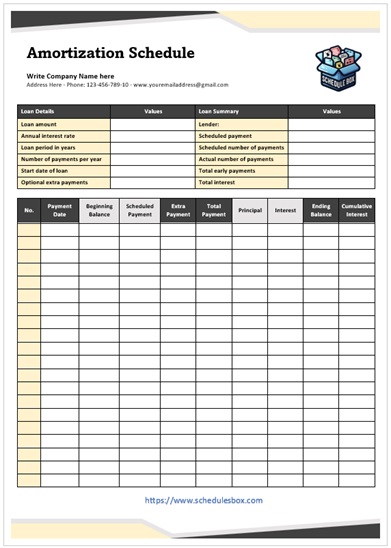
A professional amortization schedule template is more than just a list of dates. To be effective, it must contain several key data points and calculated fields:
- Loan Principal: The total amount of money borrowed at the start of the loan.
- Interest Rate: The annual percentage rate (APR), usually expressed as a percentage.
- Loan Term: The duration of the loan (e.g., 15 years, 30 years, or 60 months).
- Payment Frequency: Whether payments are made monthly, bi-weekly, or quarterly.
- Payment Number: A sequential list (1, 2, 3…) marking each installment.
- Scheduled Payment: The fixed amount due each period.
- Principal Component: The portion of the current payment that reduces the loan balance.
- Interest Component: The portion of the current payment that goes to the lender.
- Remaining Balance: The outstanding principal after the payment has been applied.
- Cumulative Interest: A running total of all interest paid to date.
Download Free Amortization Schedule Template

Benefits of Using a Template
While you can calculate these figures manually, using a dedicated amortization schedule template offers significant advantages:
1. Unmatched Accuracy
Manual calculations are prone to human error, especially when dealing with compounding interest and decimal points. A template uses pre-set formulas that ensure every cent is accounted for, providing a reliable source of truth for your finances.
2. Time Savings
Setting up a table for a 30-year mortgage (360 payments) would take hours of manual entry. A template allows you to generate a full 360-month schedule in seconds simply by changing three or four input variables.
3. Strategic “What-If” Analysis
Templates allow users to perform sensitivity analysis. For example, you can ask: *”What happens if I increase my monthly payment by $200?”* The template will instantly show you how much total interest you save and how many months earlier the loan will be paid off.
4. Professional Record Keeping
For businesses, an amortization schedule is a vital piece of documentation for audits and financial reporting. It provides a clean, standardized trail of debt reduction that is easily understood by stakeholders and tax authorities.
5. Improved Compliance and Budgeting
By knowing exactly how much interest is paid each year, businesses can manage their cash flow more effectively and ensure they are meeting their debt covenants without surprises.
Who Can Use This Template?
The versatility of an amortization schedule makes it useful across various sectors:
- Homebuyers: To track mortgage progress and plan for early payoffs.
- Entrepreneurs: To manage equipment loans, SBA loans, or startup capital repayments.
- Car Buyers: To understand the true cost of an auto loan versus a cash purchase.
- Students: To map out the repayment of federal or private student loans.
- Real Estate Investors: To calculate the cash flow of rental properties by factoring in the monthly principal and interest.
- Financial Planners: To build comprehensive debt-reduction strategies for their clients.
How to Customize the Template?
To get the most value from your template, you should customize it to fit your specific financial situation. Here is a step-by-step approach:
Step 1: Input Your Base Variables
Begin by entering your Loan Amount, Annual Interest Rate, and Term. Ensure your interest rate is entered as a percentage (e.g., 4.5% rather than 0.045, depending on the template’s formatting).
Step 2: Adjust for Extra Payments
Most advanced templates include a column for Additional Principal. This is the most powerful part of the tool. By adding even a small amount here, you can observe the domino effect where the remaining balance drops faster, leading to less interest charged in all subsequent months.
Step 3: Format for Readability
If you are presenting this to a client or partner, use conditional formatting to highlight key milestones—such as the point where the principal payment finally exceeds the interest payment.
Step 4: Sync with Your Calendar
Convert the payment numbers into actual dates. Instead of Payment 1, use January 2024. This turns a mathematical table into a concrete calendar of obligations.
Common Mistakes to Avoid
Even with a template, users can make errors that lead to inaccurate projections:
- Confusing APR with Nominal Rate: Ensure you are using the correct interest rate. The Annual Percentage Rate (APR) includes fees and may differ from the base interest rate.
- Ignoring Escrow/PMI: Many people confuse their *total* mortgage payment with their *principal and interest* (P&I) payment. An amortization schedule only tracks P&I. Taxes and insurance (escrow) should be tracked separately.
- Forgetting Simple vs. Compound Interest: Most templates assume monthly compounding. If your loan uses a different method (like daily simple interest), the calculations may vary slightly.
- Applying Extra Payments to Interest: When making extra payments, always specify that the additional funds should be applied to the principal. Some lenders may apply it to the next scheduled payment instead, which does not reduce the overall interest cost.
Related Templates and Documents
If you are organizing your finances, an amortization schedule is often the centerpiece of a larger toolkit. You may also find these resources helpful:
- Debt Snowball Worksheet: For those managing multiple loans and wanting to prioritize them by balance size.
- Loan Comparison Calculator: To compare two different loan offers before signing a contract.
- Budget Planner: To determine how much “extra” you can realistically allocate toward your principal each month.
- Balance Sheet Template: To track your total liabilities (including the remaining balance from your amortization schedule) against your assets.
- Investment ROI Tracker: To compare the benefit of paying off a loan versus investing that same money in the stock market.
Frequently Asked Questions (FAQ)
1. What is the difference between amortization and depreciation?
Amortization refers to paying off a debt (like a loan) over time. Depreciation refers to the loss of value of a physical asset (like a vehicle or machinery) over time. While both involve spreading a cost over a period, amortization is about liability, and depreciation is about asset value.
2. Can I use an amortization schedule for a credit card?
While possible, it is difficult because credit cards have variable interest rates and revolving balances. Amortization schedules work best for “closed-end” loans with fixed rates and set terms (like mortgages or personal loans).
3. How does an extra payment affect my amortization schedule?
An extra payment reduces the principal balance immediately. Since interest is calculated based on the remaining principal, a lower balance means less interest is accrued in every following month, effectively shortening the life of the loan.
4. Why is my payment mostly interest in the beginning?
This is a standard feature of fixed-rate loans. Since the interest is calculated on the total outstanding balance, and the balance is highest at the start, the interest charge is also at its peak. As the principal drops, the interest cost drops.
5. Is an amortization schedule the same as a payment plan?
A payment plan is a general agreement on how to pay a debt. An amortization schedule is the detailed mathematical breakdown of that plan, showing exactly how each payment is split between principal and interest.
6. What software is best for an amortization schedule template?
Microsoft Excel and Google Sheets are the gold standards because they handle complex financial formulas automatically. However, PDF printable versions are excellent for those who prefer manual tracking.
Conclusion
An amortization schedule template is more than just a financial document; it is a tool for empowerment. By stripping away the complexity of interest rates and payment cycles, it allows you to see the finish line of your debt and provides the data necessary to reach that line faster.
Whether you are utilizing a template to manage a corporate portfolio or simply trying to pay off your home ahead of schedule, the clarity provided by a structured schedule is invaluable. Start by inputting your current loan details, experiment with additional principal payments, and take full control of your financial future. Stop guessing where your money is going and start directing it toward your ultimate goal: total financial freedom.