Whether you are a university professor designing a semester-long curriculum, a corporate trainer onboarding new employees, or a student attempting to balance five different subjects and a part-time job, organization is the cornerstone of success. The challenge isn’t just knowing what needs to be learned, but when and how it will be delivered.
This is where a course schedule template becomes indispensable. Rather than starting from a blank page and risking the omission of critical deadlines or overlapping lectures, a structured template provides a roadmap for the entire educational journey. By transforming a chaotic list of requirements into a visual, chronological plan, a course schedule template reduces cognitive load, eliminates scheduling conflicts, and ensures that both educators and learners remain aligned throughout the term.
What Is a Course Schedule Template?
A course schedule template is a pre-formatted document—available in digital formats like Google Sheets, Excel, Word, or Notion—designed to organize the timeline of an educational program. Unlike a simple calendar, which merely marks dates, a course schedule template integrates pedagogical goals with time management.
At its core, it serves as a chronological blueprint. It outlines the sequence of modules, the specific topics to be covered in each session, assigned readings, submission deadlines, and examination dates. For instructors, it functions as a syllabus supplement; for students, it acts as a personalized productivity tracker. In a corporate setting, it often takes the form of a “Training Roadmap,” ensuring that professional development occurs without disrupting daily operational workflows.
Purpose and Importance
The primary purpose of a course schedule template is to create transparency and predictability. When the path from Day 1 to Graduation/Certification is clearly mapped, anxiety decreases and focus increases.
For Educators and Trainers
For those leading the course, the template is a tool for instructional design. It prevents content cramming at the end of the semester by forcing the creator to allocate realistic timeframes for each topic. It also serves as a contract of sorts between the teacher and the student, setting clear expectations for workload and milestones.
For Students and Learners
For the learner, the template is a survival guide. In an environment of competing priorities, having a centralized document that highlights upcoming milestones allows students to practice “backward planning”—working backward from a final exam date to determine when they must begin studying.
For Institutions and HR Departments
In institutional or corporate environments, these templates ensure consistency. If multiple instructors are teaching the same certification course, a standardized course schedule template guarantees that every cohort receives the same quality and quantity of information.
Key Elements Included
A professional course schedule template is more than just a list of dates. To be truly effective, it should include the following semantic elements:
- Course Information: The course title, code, instructor name, and contact details.
- Chronological Timeline: Columns or rows divided by weeks, days, or modules (e.g., “Week 1: Introduction to Macroeconomics”).
- Topic/Module Descriptions: A brief summary of the core concept being covered in each session.
- Learning Objectives: Specific goals for each unit (e.g., “By the end of this week, students will be able to calculate ROI”).
- Required Readings and Resources: References to textbooks, PDFs, video lectures, or external articles needed for that specific timeframe.
- Assignments and Deliverables: Clear markers for when essays, projects, or lab reports are due.
- Assessment Dates: Scheduled dates for quizzes, midterms, and final exams.
- Office Hours/Support Windows: Dedicated times for Q&A and instructor availability.
- Milestones: Major checkpoints that signal the completion of a significant portion of the course.
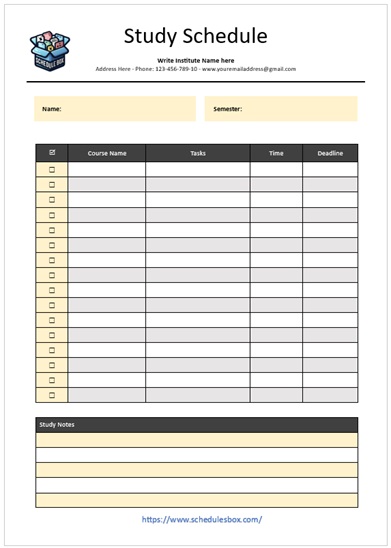
Download this Study Schedule Template

Benefits of Using a Template
Choosing a template over a manual list provides several strategic advantages:
1. Significant Time Savings
Creating a schedule from scratch requires tedious formatting. A template allows you to jump straight to the content, utilizing pre-set grids and categories.
2. Improved Accuracy and Reduced Overlap
Templates often include visual cues that help you spot scheduling conflicts. For instance, seeing a “Major Project Due” date coinciding with a “Midterm Exam” allows you to shift deadlines before they become a source of stress for the students.
3. Professional Appearance
A well-structured template conveys authority and preparedness. For corporate trainers or freelance educators, presenting a polished, clean schedule increases the perceived value of the course.
4. Consistency Across Cohorts
When using a template, you can easily duplicate the structure for the next semester, making only minor adjustments to dates while keeping the pedagogical flow intact.
5. Better Record Keeping
Templates provide a historical archive. By saving the schedule for each term, educators can analyze which sections took longer than expected and refine the curriculum for future iterations.
6. Compliance and Accreditation
In accredited academic programs, providing a detailed course schedule is often a regulatory requirement to prove that the curriculum meets specific credit-hour standards.
Who Can Use This Template?
The versatility of a course schedule template makes it applicable across various sectors:
- K-12 Teachers: To organize lesson plans and align them with state-mandated testing dates.
- University Professors: To manage complex syllabi across multiple lecture sections.
- Corporate L&D (Learning and Development) Managers: To schedule employee onboarding, compliance training, or leadership workshops.
- Online Course Creators: To map out the “drip content” delivery for students in a membership site or LMS (Learning Management System).
- Self-Taught Learners: Individuals pursuing certifications (like PMP, AWS, or CPA) who need to hold themselves accountable through a structured study plan.
- Bootcamp Organizers: To manage intensive, fast-paced curricula where every hour is accounted for.
How to Customize the Template
To get the most out of your course schedule template, avoid treating it as a static document. Follow these steps for effective customization:
- Define Your Time Blocks: Decide if your course is organized by weeks (standard), modules (competency-based), or days (intensive). Adjust the columns accordingly.
- Color-Code by Category: Use conditional formatting or manual shading to differentiate between “Lecture Days” (Blue), “Study Days” (Green), and “Assessment Days” (Red). This allows for a quick visual scan of the workload.
- Integrate Hyperlinks: If using a digital template (Google Sheets/Notion), link the “Required Readings” column directly to the PDF or website. This turns the schedule into a central hub for all course materials.
- Set Buffer Zones: Never schedule content for 100% of your available time. Leave “Buffer Weeks” or “Catch-up Days” to account for unexpected holidays, illness, or topics that require more depth.
- Align with External Calendars: Ensure the template dates sync with the institution’s academic calendar to avoid scheduling a class on a campus holiday.
Common Mistakes to Avoid
Even with a template, errors can occur. Avoid these frequent pitfalls:
Overloading the Schedule: The “Optimism Bias” often leads creators to pack too much into one week. Be realistic about how much a student can absorb.
Vague Descriptions: Using “Topic 1” instead of “Introduction to Quantum Mechanics” leaves students confused. Be specific.
Ignoring the Student Perspective: Creating a schedule that has three major assignments due in a single week creates burnout. Spread deliverables evenly.
Static Distribution: Distributing a PDF that cannot be updated. Instead, provide a live link (like a Google Doc) so that when a date changes, everyone sees the update in real-time.
Forgetting the “Why”: Listing a reading without explaining its purpose. Briefly note why that specific resource is essential for the module.
Related Templates and Documents
Depending on your goals, a course schedule template is often used in conjunction with these other resources:
- Syllabus Template: The comprehensive document that includes policies, grading scales, and the overarching course philosophy.
- Lesson Plan Template: A granular, hour-by-hour breakdown of a single class session.
- Student Progress Tracker: A checklist for learners to mark off completed modules.
- Rubric Template: A detailed guide on how assignments listed in the schedule will be graded.
- Academic Calendar: The high-level institutional map of holidays and term dates.
Frequently Asked Questions (FAQ)
1. What is the difference between a course schedule and a syllabus?
A syllabus is a comprehensive guide that includes the course description, policies, grading criteria, and expectations. A course schedule is a specific component (or supplement) of the syllabus that focuses exclusively on the *timeline* and the *chronological order* of topics and assignments.
2. Which software is best for a course schedule template?
It depends on your needs. **Excel or Google Sheets** are best for grid-based, date-driven schedules. **Microsoft Word or Google Docs** are better for text-heavy schedules. **Notion or Trello** are ideal for dynamic, interactive schedules that allow students to click into modules for more detail.
3. How often should I update my course schedule?
While the core structure may remain the same, it is best to review the schedule weekly. If a particular topic takes longer than expected, update the template immediately and notify students to keep the roadmap accurate.
4. Can I use a course schedule template for self-study?
Absolutely. In fact, it is highly recommended. Mapping out your self-study goals into a template prevents procrastination and ensures you cover all necessary material before your exam date.
5. How do I handle “Flexible” or “Self-Paced” courses in a template?
Instead of using specific dates (e.g., “October 12th”), use “Relative Dates” (e.g., “Module 1: Day 1-7”). This allows the learner to start whenever they wish while still following the structured sequence.
Conclusion
A well-designed **course schedule template** is more than just an administrative tool; it is a psychological asset. For the educator, it provides the confidence that the curriculum is balanced and comprehensive. For the student, it replaces the anxiety of the unknown with a clear, actionable path toward mastery.
By incorporating key elements like learning objectives, buffer zones, and clear deliverables, you transform a simple list of dates into a strategic roadmap for success. Whether you are managing a corporate training program or navigating a rigorous university degree, utilizing a structured template ensures that no detail is overlooked and no deadline is missed. Stop guessing and start planning—your productivity depends on it.