In an era of constant notifications and overlapping commitments, the ability to organize one’s time is no longer just a “soft skill”—it is a critical necessity for mental well-being and professional success. Whether you are a corporate executive managing a team, a student balancing credits and extracurriculars, or a freelancer juggling multiple clients, the feeling of “not having enough hours in the day” is a common struggle.
The solution isn’t necessarily working harder, but working more intentionally. This is where a weekly schedule template becomes an invaluable asset. By transitioning from a chaotic to-do list to a structured visual map of your week, you can reclaim your time, reduce decision fatigue, and ensure that your highest-priority tasks actually get completed.
What Is a Weekly Schedule Template?
A weekly schedule template is a pre-formatted document—available in digital formats like Excel, Google Sheets, PDF, or as a physical printable—designed to help individuals and teams plan their activities over a seven-day period. Unlike a daily planner, which focuses on the immediate “now,” or a monthly calendar, which provides a high-level overview, a weekly template strikes the perfect balance between granular detail and big-picture perspective.
At its core, this template acts as a blueprint for your time. It typically features a grid system where the vertical axis represents time increments (hourly or half-hourly) and the horizontal axis represents the days of the week. Modern templates often incorporate specialized sections for goals, habits, and “top priorities” to ensure that the user is not just filling time, but achieving objectives.
Purpose and Importance
The primary purpose of a weekly schedule is to eliminate the ambiguity of “what comes next.” When you rely on memory or a scattered list of notes, you experience a cognitive load known as the Zeigarnik Effect—the tendency to experience intrusive thoughts about a task that is incomplete. A structured template offloads this mental burden onto a physical or digital page.
For organizations and businesses, these templates are essential for resource allocation and workforce management. They allow managers to visualize employee availability, prevent burnout by balancing workloads, and ensure that critical deadlines are met without last-minute panic. In educational settings, students use these templates to synchronize study blocks with lecture times, ensuring that “cramming” is replaced by consistent, spaced repetition.
Ultimately, the importance of a weekly schedule lies in intentionality. It transforms your time from a resource that “happens to you” into a tool that you actively direct toward your goals.
Key Elements Included in a Professional Template
While schedules vary depending on the user’s needs, a comprehensive and effective weekly schedule template generally includes the following components:
- Time Blocks: Clearly defined rows (e.g., 6:00 AM to 10:00 PM) that allow for “time blocking,” a productivity technique where you assign a specific task to a specific window of time.
- Date Range: A dedicated space to indicate the specific week being planned (e.g., “October 2nd – October 8th”).
- Priority Matrix: A section for “Top 3 Goals of the Week.” This prevents the user from getting bogged down in trivial tasks while neglecting high-impact projects.
- Habit Tracker: A small checklist area to track recurring daily actions, such as exercise, meditation, or reading, which contribute to long-term growth.
- Notes/Brain Dump Section: A flexible area to jot down ideas, reminders, or tasks that arise during the week but haven’t yet been assigned a specific time slot.
- Color-Coding Key: A legend that allows users to categorize activities (e.g., Blue for deep work, Green for personal/family, Red for urgent meetings).
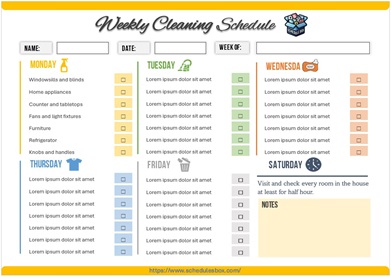
Download Free Weekly Schedule Template

Benefits of Using a Weekly Schedule Template
Implementing a standardized template over a makeshift list offers several strategic advantages:
1. Significant Time Savings
The act of planning your week on Sunday evening usually takes 20–30 minutes, but it saves hours of wasted time during the week. You no longer spend precious mental energy deciding what to do next; you simply follow the map you have already created.
2. Increased Accuracy and Reliability
Templates help you realize the reality of time. Many people fall victim to the “planning fallacy,” believing they can accomplish ten tasks in two hours. By physically mapping tasks into a weekly schedule template, you can see if your plan is realistic or if you are overcommitting.
3. Professional Appearance and Consistency
In a business environment, sharing a structured schedule with a team or supervisor demonstrates a high level of organization and professionalism. It provides a transparent view of your workflow and availability, reducing unnecessary back-and-forth emails regarding scheduling.
4. Better Record Keeping
When you keep a history of your weekly schedules, you create a data set of your productivity. You can look back and identify patterns—such as realizing you are most productive on Tuesday mornings—and adjust your future templates to maximize that peak energy.
5. Stress Reduction and Compliance
For those in regulated industries or academic programs, schedules ensure compliance with mandatory hours or credit requirements. More importantly, knowing that everything is “accounted for” significantly lowers anxiety and prevents the feeling of being overwhelmed.
Who Can Use This Template?
The versatility of a weekly schedule template makes it applicable across various domains:
- Corporate Professionals: To manage meetings, project milestones, and “deep work” sessions without interruption.
- Entrepreneurs and Freelancers: To separate business operations from personal time, preventing the common “always-on” burnout.
- Students: To coordinate class schedules, assignment deadlines, and study groups.
- Stay-at-Home Parents: To organize household chores, children’s activities, meal planning, and personal self-care.
- Health and Fitness Coaches: To map out client sessions, workout plans, and nutritional tracking.
- HR Managers: To coordinate employee shifts, onboarding schedules, and performance review cycles.
How to Customize the Template for Your Needs
A template is a starting point, not a rigid cage. To get the most out of your weekly schedule template, consider these customization tips:
- Identify Your “Energy Peaks”: If you are a morning person, schedule your most cognitively demanding tasks (writing, analyzing, strategizing) for the early hours. Reserve the “afternoon slump” for low-energy tasks like emails or filing.
- Build in “Buffer Time”: Never schedule your day back-to-back. Leave 15–30 minute gaps between major tasks to account for travel, technical glitches, or mental resets.
- Thematic Grouping: Try “Day Theming.” For example, make Mondays “Admin Day,” Tuesdays “Client Day,” and Wednesdays “Development Day.” This reduces the mental cost of switching between different types of work.
- Digital vs. Analog: If you struggle with digital distractions, print your template and keep it on your desk. If you need accessibility across devices, use a cloud-based version with automated reminders.
Common Mistakes to Avoid
Even with a great template, poor planning can lead to frustration. Avoid these frequent pitfalls:
- Over-Scheduling: Filling every single block of time leads to rigidity. When one task runs over (which it often does), the entire week collapses like a house of cards.
- Underestimating Transition Time: Forgetting that a 30-minute meeting actually requires 10 minutes to prepare and 5 minutes to wrap up.
- Ignoring Self-Care: Scheduling work from 8 AM to 8 PM without breaks for lunch, movement, or sleep is unsustainable and leads to diminishing returns in productivity.
- Lack of Flexibility: Treating the schedule as a law rather than a guide. Be prepared to pivot when urgent, high-priority issues arise.
Related Templates and Documents
Depending on your goals, you may find it helpful to pair your weekly schedule with these complementary resources:
- Daily Planner Page: For a more granular look at the current day’s hourly tasks.
- Monthly Goal Tracker: To ensure your weekly tasks are aligning with your broader monthly objectives.
- Time Audit Worksheet: Used for one week to track exactly where your time goes before applying it to a template.
- Project Milestone Calendar: For tracking long-term deliverables that span several weeks or months.
- Employee Shift Schedule: A specialized version of the weekly template used for managing staff rotations.
Frequently Asked Questions (FAQ)
What is the difference between a weekly schedule and a to-do list?
A to-do list is a collection of tasks that need to be done, but it lacks a time dimension. A weekly schedule template assigns those tasks to specific times, turning a “wish list” into an actionable plan.
Can I use a weekly schedule template for a team?
Yes. By using a shared digital template (like Google Sheets), teams can coordinate their availability, avoid overlapping meetings, and ensure that all critical roles are covered throughout the week.
Is it better to use a digital or printable weekly schedule?
It depends on your habits. Digital templates offer flexibility, easy editing, and synchronization. Printable templates reduce screen time, allow for tactile satisfaction (crossing things off), and are often less distracting.
How do I handle unexpected tasks that aren’t on my schedule?
This is why “Buffer Time” is essential. If a task is urgent, slot it into your buffer. If it is not urgent, add it to the “Notes/Brain Dump” section of your template and assign it a time slot during your next weekly planning session.
How often should I update my weekly schedule?
Ideally, you should perform a “Weekly Review” every Sunday or Monday morning to set the coming week’s plan. Additionally, a quick 5-minute daily review every evening helps you adjust the next day’s specifics based on what was actually achieved.
Conclusion
A weekly schedule template is far more than just a grid of boxes; it is a strategic tool for designing a life of balance and productivity. By moving away from reactive planning and embracing a structured, intentional approach to your time, you can reduce stress and increase your output without increasing your hours of work.
Whether you choose a minimalist printable or a complex digital spreadsheet, the key to success is consistency. Start by mapping out your non-negotiables, building in necessary buffers, and reviewing your progress at the end of each week. Your time is your most valuable resource—start managing it with precision and purpose.