Managing a workforce that requires 24-hour, 365-day coverage is one of the most complex challenges in operational management. Whether it is a high-security facility, a chemical plant, a healthcare wing, or a critical infrastructure site, the goal is always the same: ensure maximum site coverage while preventing employee burnout.
Enter the DuPont Schedule. Known for its unique approach to rotation and recovery, this scheduling method has become a gold standard for industries that cannot afford a single minute of downtime. However, implementing this system manually can be a logistical nightmare. This is where a **DuPont Schedule template** becomes indispensable. By providing a structured framework, these templates allow managers to visualize rotations, track employee fatigue, and ensure seamless handovers without the risk of human error.
What Is a DuPont Schedule Template?
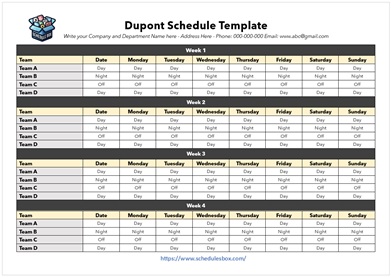
A DuPont Schedule template is a specialized workforce management tool designed to implement the “DuPont Shift Rotation.” Unlike a standard 9-to-5 or a simple two-shift rotation, the DuPont system is a four-team, 12-hour shift rotation.
The core philosophy of the DuPont schedule is to provide employees with significant blocks of consecutive days off to compensate for the intensity of 12-hour shifts. This is typically achieved through a cycle that involves a mix of day shifts, night shifts, and extended breaks.
A professional template digitizes this complex rotation. Instead of drawing lines on a whiteboard, a template provides a pre-calculated grid—often in Excel or Google Sheets—where managers can assign “Teams” (A, B, C, and D) to specific slots. The template automatically tracks who is on duty, who is on a “swing” shift, and who is in their recovery period, ensuring that the facility is always staffed by the required number of personnel.
Purpose and Importance
The primary purpose of using a DuPont Schedule template is to balance operational continuity with human sustainability. In 24/7 environments, the “human element” is the most volatile variable. Fatigue leads to accidents, and erratic scheduling leads to high turnover.
The importance of this template lies in three critical areas:
- Predictability: Employees can look at a template and know their schedule months in advance. This stability improves morale and allows staff to plan their personal lives, which is often the biggest pain point for shift workers.
- Fatigue Management: The DuPont system is specifically engineered to allow for “recovery.” By using a template to strictly adhere to the rotation, companies prevent “shift creep,” where employees are accidentally scheduled for too many consecutive nights.
- Operational Redundancy: The template ensures that there is always a designated team on site. If an emergency occurs, the manager knows exactly which team is on the clock and which team is on “call” or available for backup.
Key Elements Included
A high-quality DuPont Schedule template is more than just a calendar; it is a strategic document. To be effective, it must include the following elements:
- Team Designations: Clear labeling of the four rotating teams (e.g., Team Alpha, Bravo, Charlie, Delta).
- Shift Time-Blocks: Defined start and end times for the 12-hour blocks (typically 7 AM to 7 PM and 7 PM to 7 AM).
- Rotation Cycle Indicator: A visual marker showing where the current week falls within the overall cycle (usually a 4-week or 28-day period).
- Day/Night Indicators: Color-coded cells to distinguish between day shifts (D) and night shifts (N) at a glance.
- Off-Duty/Recovery Days: Clearly marked “off” days to ensure no team is overworked.
- Employee Roster Integration: A section to map individual names to the designated teams.
- Total Hours Tracker: A formula-based column that calculates the total hours worked per person per pay period to ensure compliance with labor laws.
Benefits of Using a Template
Moving from a manual scheduling process to a dedicated DuPont Schedule template offers several organizational advantages:
Time Savings
Creating a 24/7 rotation from scratch every month is a grueling task. A template eliminates the need to “rebuild the wheel.” Managers simply input the start date, and the rotation propagates across the calendar.
Accuracy and Error Reduction
Manual scheduling is prone to “gaps”—hours where no one is assigned—or “overlaps,” where too many people are clocked in. A template uses a fixed logic system that ensures 100% coverage without gaps.
Professional Appearance and Clarity
When schedules are handwritten or poorly formatted, communication breakdowns occur. A clean, digital template can be exported as a PDF and emailed to all staff, ensuring everyone has the same version of the truth.
Consistency in Rotation
The DuPont system only works if the rotation is consistent. If a manager starts making “one-off” changes to favor certain employees, the entire cycle collapses. A template enforces the systemic nature of the rotation.
Compliance and Record Keeping
In regulated industries (like pharmaceuticals or energy), proving that staff had adequate rest periods is a legal requirement. Templates provide a digital paper trail that serves as evidence of compliance with health and safety regulations.
Who Can Use This Template?
The DuPont Schedule is not a one-size-fits-all solution, but it is ideal for specific high-stakes environments.
- Manufacturing and Chemical Plants: Facilities that run continuous processes where a shutdown is prohibitively expensive.
- Healthcare Facilities: Hospitals and specialized clinics that require 24-hour nursing or technician presence.
- Emergency Services: Fire departments and EMS providers who need a sustainable way to manage long shifts.
- Data Centers and IT Operations: Network Operations Centers (NOCs) that require “eyes on screens” 24/7 to prevent systemic failures.
- Security Firms: High-security installations where guard rotations must be precise and predictable.
- Law Enforcement: Specialized units that operate on a rotating shift basis to maintain city-wide coverage.
Download Free DuPont Schedule Template

How to Customize the Template
Once you have downloaded a DuPont Schedule template, you should not simply “plug and play.” Customization is key to making the system work for your specific team.
- Define Your Shift Times: While 7-to-7 is standard, some facilities prefer 6-to-6 or 8-to-8. Adjust the time-block headers in your template to reflect your operational reality.
- Assign Your Teams: Divide your total staff into four equal groups. If you have 20 employees, you will have four teams of five. Enter these names into the team roster section.
- Adjust for Holidays: The DuPont cycle is rigid, but holidays often require special handling. Use a different color (e.g., Red) to highlight statutory holidays and note if “holiday pay” or “comp time” applies.
- Integrate a “Swing” Logic: Depending on your variation of the DuPont schedule, you may have a “swing” day. Ensure your template clearly marks the transition from day shift to night shift to give employees maximum sleep time.
- Automate with Conditional Formatting: If using Excel, set up conditional formatting so that “D” turns green and “N” turns blue. This makes the schedule readable from a distance when printed on a breakroom wall.
Common Mistakes to Avoid
Even with a professional template, implementation can fail if these common pitfalls are ignored:
- Ignoring the “Recovery” Window: The biggest mistake is scheduling an employee for an extra shift during their designated off-period. This defeats the purpose of the DuPont system and leads to rapid burnout.
- Over-complicating the Rotation: Trying to blend the DuPont system with other rotation types often creates a “hybrid” that no one understands. Stick to the core logic of the template.
- Failure to Communicate Changes: If a manager changes a shift in the template but doesn’t redistribute the document immediately, it leads to “no-shows” and staffing gaps.
- Not Accounting for PTO: A template shows who *should* be there, but not who *is* available. Always maintain a separate “Leave Tracker” alongside your schedule template.
Related Templates and Documents
If you are optimizing your workforce management, the DuPont Schedule template is a great start, but it should be paired with other organizational tools:
- Shift Handover Report: A document used during the 15-30 minute window where the outgoing team briefs the incoming team on critical events.
- Employee Availability Calendar: A tool for staff to log their preferred days off or blackout dates.
- Overtime Tracking Sheet: Since 12-hour shifts can quickly lead to overtime, a dedicated tracker is essential for payroll accuracy.
- On-Call Rotation Template: For those days when a team is “off” but must remain available for emergencies.
- Incident Log Book: A chronological record of events that occurred during specific shifts.
Frequently Asked Questions (FAQ)
1. What is the main difference between a DuPont and a Pitman schedule?
The Pitman schedule (or “2-2-3”) focuses on shorter rotations with more frequent days off. The DuPont schedule typically allows for longer stretches of consecutive days off (sometimes up to 7 days), making it more attractive for employees who value extended periods of rest.
2. Is the DuPont schedule better for employees or employers?
It is a compromise. Employers get 24/7 coverage and a predictable staffing model. Employees get longer breaks and fewer commutes to the workplace, though the 12-hour workdays are physically demanding.
3. Can I use a DuPont Schedule template in Google Sheets?
Yes. Most DuPont templates are designed for Excel but are fully compatible with Google Sheets, which is actually preferred for real-time collaboration and sharing with a remote team.
4. How do I handle staffing shortages using this template?
If one team is understaffed, you can use the template to identify which other team is currently in their longest “off” period and offer overtime to those specific individuals.
5. Does the DuPont system comply with labor laws?
Generally, yes, but it depends on your local jurisdiction’s laws regarding maximum hours worked per week. Always use the “Total Hours Tracker” in your template to ensure no one exceeds legal limits.
6. How often should the rotation cycle be reset?
The DuPont cycle is typically a repeating 28-day (4-week) loop. Once the four teams have all passed through every phase of the rotation, the cycle simply restarts from Day 1.
Conclusion
A 24/7 operation is only as strong as its scheduling logic. Without a structured approach, the stress of constant rotation can lead to operational errors, employee dissatisfaction, and costly turnover.
The DuPont Schedule template transforms a chaotic logistical puzzle into a streamlined, predictable system. By prioritizing recovery and maintaining a rigid rotation, organizations can ensure their facilities are always staffed by alert, well-rested professionals. Whether you are managing a small security team or a massive industrial plant, leveraging a professional template is the most effective way to guarantee that your workforce remains sustainable and your operations remain uninterrupted.