We have all been there: a desk cluttered with sticky notes, a mind racing with “don’t forget” reminders, and the lingering anxiety that something critical is slipping through the cracks. The feeling of being overwhelmed isn’t usually a result of having too much work, but rather a lack of a reliable system to capture and categorize that work. This is where a professional Todo List Template becomes more than just a piece of paper—it becomes a cognitive external hard drive.
A ToDo List Template is a structured framework designed to offload mental clutter and organize tasks based on priority, deadline, and energy requirements. Whether you are managing a complex corporate project or simply trying to keep your household running smoothly, the right template transforms a chaotic “wish list” of chores into a strategic roadmap for execution. By utilizing a standardized format, you eliminate the “decision fatigue” of deciding how to organize your day, allowing you to spend your mental energy on actually completing the work.
The Deep Dive: Why a Structured Todo List Template is Critical for Success
Many people mistake a simple list for a productivity system. However, a random list of tasks often leads to the “productivity paradox,” where you spend the entire day crossing off easy, low-value tasks while the most important projects remain untouched. This is why a dedicated Todo List Template is essential; it enforces a level of intentionality that a blank notebook cannot provide.
The hidden value of using a template lies in accountability and psychological momentum. When you use a structured template, you are forced to categorize tasks, assign deadlines, and define success. This process creates an “implementation intention”—a psychological commitment to act. From a professional standpoint, the benefits are multifaceted:
- Reduced Cognitive Load: By capturing every task in a trusted system, you free up the prefrontal cortex to focus on deep work rather than remembering reminders.
- Elimination of Analysis Paralysis: A template with pre-defined priority levels (High, Medium, Low) tells you exactly where to start your morning.
- Measurable Progress: Seeing a visual representation of completed tasks triggers a dopamine release, which fuels the motivation to tackle the next item.
- Audit Trails for Performance: For professionals, a historical record of completed lists provides invaluable data during performance reviews or project retrospectives.
Without this structure, you risk “urgency addiction,” where you only respond to the loudest demand rather than the most important goal. A template shifts you from a reactive state to a proactive state.
Anatomy of a Perfect Todo List Template
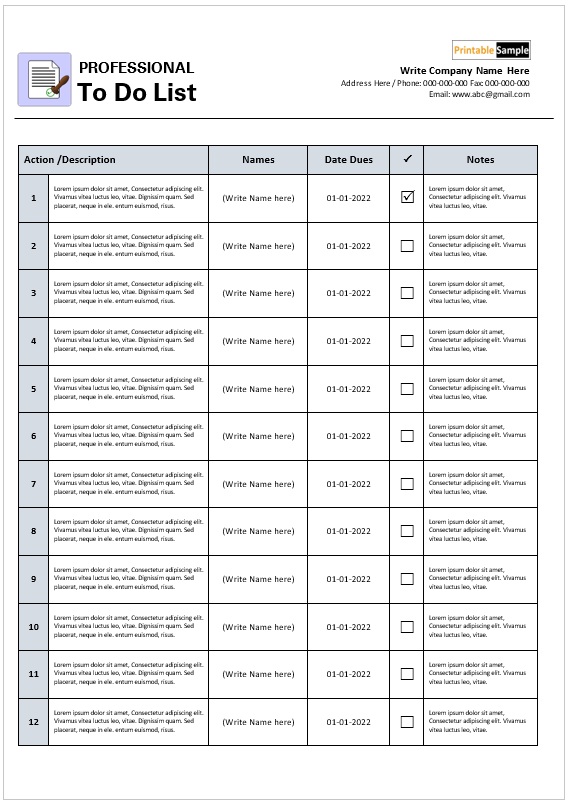
Not all lists are created equal. A high-performing ToDo List Template must go beyond a simple checkbox. To maximize efficiency, your template should incorporate the following core components to ensure no detail is overlooked:
1. The Task Identifier (The “What”)
This is the core of the list. Instead of vague terms like “Marketing,” a professional template encourages action-oriented verbs (e.g., “Draft 3 social media captions for the product launch”).
2. Priority Designation (The “When”)
A column for priority is non-negotiable. Whether you use a letter system (A, B, C) or a numerical scale (1-3), this allows you to differentiate between “critical” and “nice-to-have.” Advanced templates often utilize the Eisenhower Matrix categories: Urgent/Important, Not Urgent/Important, Urgent/Not Important, and Not Urgent/Not Important.
3. Due Date and Time Blocks (The “Where in Time”)
A task without a deadline is merely a suggestion. Your template should include a specific date and, ideally, a designated time block. This prevents the common mistake of overestimating how much can be achieved in a single 8-hour window.
4. Energy Level/Context Tags
The most sophisticated templates include a “Context” or “Energy” column. This allows you to filter tasks based on your current state. For example, “Low Energy” tasks (like filing emails) are scheduled for the post-lunch slump, while “High Energy” tasks (like strategic planning) are reserved for your peak morning hours.
5. The “Done” Verification
A satisfying checkbox or a “Completed” column. This provides the visual closure necessary to signal to your brain that a mental loop has been closed.
6. Notes/Dependencies Section
A small area to list what is required to complete the task (e.g., “Waiting on approval from Sarah”). This prevents you from starting a task only to realize you are blocked by an external factor.
Step-by-Step Guide: How to Customize and Use Your ToDo List Template
Having the template is only 10% of the battle; the remaining 90% is the discipline of the workflow. Follow this chronological process to integrate your ToDo List Template into your daily routine for maximum impact.
Step 1: The “Brain Dump” (Evening Before)
Never start your day by writing your list; that wastes your peak morning energy. Every evening, perform a “brain dump.” Write every single obligation, worry, and task swirling in your head into a master list. This clears your mind for a better night’s sleep.
Step 2: Filter and Categorize
Transfer the items from your brain dump into your structured ToDo List Template. As you move them, assign a priority level and a deadline. If a task takes less than two minutes, do it immediately rather than adding it to the template.
Step 3: Time-Blocking the “Big Three”
Identify the three most impactful tasks on your list—these are your “Non-Negotiables.” Block out dedicated time on your calendar for these three items. Everything else on the template is secondary to these three wins.
Step 4: Execution and Real-Time Updating
As you work through your day, use the template as your single source of truth. When a new task emerges (a “pop-up”), do not let it distract you. Write it in the “Notes” section of your template and decide if it needs to be prioritized for today or moved to tomorrow’s list.
Step 5: The Daily Review
At the end of the day, review your template. Check off completed items and “migrate” unfinished tasks to the next day. This review process prevents tasks from falling through the cracks and allows you to analyze why certain items are constantly being postponed.
Download Free Todo List Template

Best Practices & Common Mistakes to Avoid
To get the most out of your ToDo List Template, avoid the common pitfalls that lead to “productivity burnout.”
Pro-Tips for Maximum Efficiency:
- Digital vs. Analog: Use a digital template (like Notion, Trello, or Excel) for long-term project tracking and a printable paper template for daily focus. The tactile act of crossing off a physical list provides a psychological reward that digital clicks cannot replicate.
- Keep it Lean: Limit your daily “High Priority” section to 3–5 items. Overloading your template leads to a sense of failure when you inevitably don’t finish 20 tasks.
Common Mistakes to Avoid:
- The “Everything is Urgent” Trap: If every item on your template is marked “High Priority,” then nothing is actually a priority. Be ruthless with your categorization.
- Vague Task Descriptions: Avoid writing “Project X.” Instead, write “Email Project X stakeholders for feedback.” Specificity reduces the friction of starting.
- Ignoring the Review: A template is a living document. If you don’t review and migrate your tasks, the template becomes a graveyard of forgotten obligations.
Frequently Asked Questions about ToDo List Templates
What is the best way to organize a to-do list?
The most effective way to organize a ToDo List Template is by using a combination of Priority Mapping and Time Blocking. Rather than a simple linear list, group your tasks by importance (Critical vs. Optional) and then assign them to specific time slots in your day. This prevents you from spending too much time on low-value activities.
How do I stop procrastinating on my to-do list?
Procrastination is usually caused by a task feeling too large or vague. To solve this, use your template to break “mountain” tasks into “molehill” steps. Instead of writing “Write Annual Report,” break it down into “Research Q1 Data,” “Draft Introduction,” and “Format Charts.” Smaller tasks reduce the perceived barrier to entry and make it easier to start.
Should I use a digital or paper to-do list template?
The answer depends on your goal. Digital templates are superior for collaboration, searchability, and recurring tasks. However, paper templates are superior for focus and memory retention. Many high-performers use a “Hybrid System”: a digital master database for all projects and a handwritten daily template for their top three priorities.
How do I prioritize tasks effectively?
Use the Eisenhower Matrix within your template. Divide tasks into four quadrants:
1. Urgent and Important (Do it now).
2. Important but Not Urgent (Schedule it).
3. Urgent but Not Important (Delegate it).
4. Neither Urgent nor Important (Delete it).
This ensures you are spending your time on growth-oriented work rather than just putting out fires.
Conclusion: Start Your Path to Clarity
A ToDo List Template is more than just a productivity hack; it is a tool for mental freedom. By moving your obligations from your mind onto a structured system, you reduce stress and increase your capacity for high-quality work. Don’t let another day disappear into a blur of “busy-ness.” Download or design your template today, commit to the evening brain dump, and take the first step toward total professional mastery.