Your laptop is more than just a piece of hardware; it is the central hub of your professional productivity and personal creativity. However, most users treat their devices with a “break-fix” mentality—waiting for the system to crash or the fans to scream before taking action. This reactive approach leads to avoidable downtime, expensive hardware failures, and sluggish performance. This is where a laptop maintenance list template becomes an indispensable asset. By transitioning from a chaotic, memory-based approach to a structured maintenance framework, you can extend the life of your machine by years and ensure that your data remains secure and accessible.
The Hidden Value of a Structured Laptop Maintenance List Template
Why bother with a formal template for something as simple as cleaning a keyboard or updating software? The answer lies in the cumulative effect of “micro-neglect.” When you skip a monthly disk cleanup or ignore a firmware update, you aren’t just delaying a task; you are introducing systemic risks into your workflow.
Implementing a laptop maintenance list template provides three primary strategic advantages:
- Predictable Performance: Regular optimization prevents the “slow creep” of system degradation. By tracking when you last cleared cache files or optimized your SSD, you maintain a “like-new” speed throughout the device’s lifecycle.
- Risk Mitigation: Many catastrophic failures—such as overheating caused by dust buildup or data loss due to outdated backup routines—are entirely preventable. A checklist transforms these critical tasks from “optional” to “mandatory.”
- Increased Resale Value: For those who upgrade their hardware every few years, a documented maintenance log serves as a “service history” (much like a car’s maintenance record), proving to potential buyers that the device was cared for professionally.
Without this level of organization, you are essentially gambling with your data. The cost of a template is zero; the cost of a failed motherboard or a corrupted hard drive is immense.
Anatomy of a Perfect Laptop Maintenance List Template
A high-quality laptop maintenance list template should not be a simple “To-Do” list. To be truly effective, it must be categorized by frequency and impact. A professional-grade template is divided into four critical quadrants: Physical Care, Software Optimization, Security Audit, and Data Integrity.
1. Physical Care & Hardware Health
- Vent & Fan Cleaning: Tracking the use of compressed air to remove dust from heatsinks.
- Screen & Keyboard Sanitization: Using isopropyl alcohol or microfiber cloths to prevent debris buildup.
- Battery Health Check: Logging battery cycle counts and maximum capacity percentages.
- Port Inspection: Checking USB-C and HDMI ports for physical wear or debris.
2. Software & OS Optimization
- OS Updates: Ensuring the latest security patches and kernel updates are installed.
- Driver Updates: Specifically targeting GPU and BIOS updates for stability.
- Disk Cleanup: Removing temporary files, emptying the recycle bin, and clearing browser caches.
- Startup App Audit: Reviewing which programs launch at boot to reduce RAM consumption.
3. Security & Privacy Shield
- Antivirus/Anti-Malware Scan: Scheduling full-system deep scans.
- Password Audit: Updating credentials and verifying that MFA (Multi-Factor Authentication) is active.
- Firewall Verification: Confirming that the network shield is active and configured correctly.
4. Data Integrity & Backups
- External Backup Verification: Confirming that the “3-2-1 backup rule” (3 copies, 2 media types, 1 offsite) is being followed.
- Cloud Sync Check: Ensuring folders are syncing correctly to OneDrive, Google Drive, or Dropbox.
- File Archive: Moving old, unused projects to cold storage to free up primary drive space.
Download Free Laptop Maintenance List Template
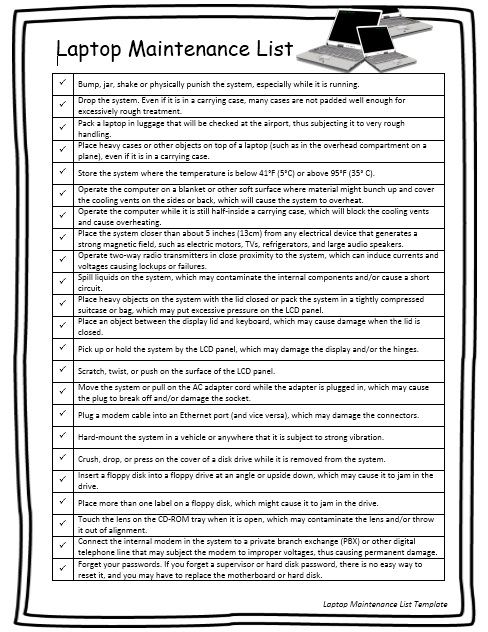

Step-by-Step Guide: How to Customize and Use Your Template
Simply downloading a laptop maintenance list template is not enough; you must integrate it into your digital habit loop. Here is the professional workflow for deploying your maintenance system.
Step 1: Define Your Frequency
Not every task happens every day. Divide your template into Weekly (Quick cleans, backup checks), Monthly (Software updates, disk cleanup), and Quarterly (Deep physical cleaning, battery health audit). Mark these dates on your digital calendar with recurring reminders.
Step 2: Tailor to Your Hardware
Customize the template based on your specific machine. If you have a gaming laptop, increase the frequency of fan cleaning due to higher heat output. If you use a MacBook, focus more on “Activity Monitor” audits; if you use Windows, prioritize “Disk Defragmentation” (on HDDs) or “TRIM” (on SSDs).
Step 3: Execution and Logging
When you perform a task, don’t just check a box. Log the date and any observations. For example, instead of just checking “Fan Cleaning,” write “Oct 12: Heavy dust removed from left vent; fan noise decreased.” This historical data is vital for diagnosing future hardware failures.
Step 4: Review and Adjust
Every six months, review your log. If you notice you are cleaning your screen weekly but your battery health is dropping rapidly, shift your focus. Adjust the template to address the specific weaknesses of your particular device.
Best Practices & Common Mistakes to Avoid
To get the most out of your laptop maintenance list template, follow these professional tips:
Pro-Tips for Efficiency:
- Go Digital: Use tools like Notion, Trello, or Google Sheets. This allows you to attach screenshots of system reports or links to driver update pages directly to the checklist.
- Batch Processing: Schedule a “Maintenance Sunday” once a month. Doing all software updates and physical cleaning in one block is more efficient than sporadic tasks.
Pitfalls to Avoid:
- Over-Cleaning: Avoid using harsh chemicals like bleach or window cleaner on your screen, which can strip the protective coating.
- Ignoring the “Invisible”: Many users focus on the physical (cleaning the screen) while ignoring the digital (updating the BIOS). A balanced template ensures both are addressed.
- The “Set and Forget” Mentality: A template is a living document. If you install new software or a new peripheral, update your checklist to include its specific maintenance needs.
Frequently Asked Questions About Laptop Maintenance
How often should I actually use a laptop maintenance list template?
For the average professional, a hybrid approach is best. Daily backups should be automated, but a manual review using a laptop maintenance list template should occur monthly. Deep physical cleaning and full security audits should be performed quarterly to prevent hardware degradation and security breaches.
Can I use the same template for both Windows and Mac?
Generally, yes. The core principles of hardware cleaning, data backup, and security are universal. However, you should customize the “Software” section. For Windows, you’ll want to include Registry cleanup or Disk Cleanup tools; for Mac, you’ll focus on managing “System Data” and optimizing macOS-specific indexing (Spotlight).
Is it necessary to have a written log if I just remember to do the tasks?
Yes. Memory is fallible. A written log provides an audit trail. If your laptop suddenly fails, having a record that you cleaned the fans and updated the BIOS two weeks ago helps a technician narrow down the problem quickly and can potentially save you money on unnecessary repairs.
What is the most critical item on a laptop maintenance checklist?
Data backup is the undisputed priority. Hardware can be replaced, and software can be reinstalled, but lost data is often permanent. Ensuring your laptop maintenance list template has a verified backup check as a non-negotiable weekly task is the single most important step in device ownership.
Conclusion: Start Your Maintenance Journey Today
Preventative care is the difference between a laptop that lasts three years and one that lasts seven. By implementing a laptop maintenance list template, you shift from a position of vulnerability to a position of control. Don’t wait for the first warning sign of failure—download or create your template today, schedule your first maintenance block, and protect your most valuable digital investment.