We have all been there: a high-stakes project launches with a surge of energy, only to dissolve into a chaotic blur of “who was doing what?” and “did we miss that deadline?” The gap between a visionary project goal and a finished deliverable is filled with hundreds of tiny, critical tasks. Without a structured system to capture them, these tasks either fall through the cracks or create a mental load so heavy it leads to burnout.
The Strategic Value: Why Your Project Needs More Than a Simple List
Many professionals mistake a “todo list” for a “scratchpad.” While a scratchpad is reactive—listing whatever pops into your head—a Project Todo List Template is proactive. It transforms the way you perceive work by shifting the focus from activity to achievement.
The hidden value of a structured template lies in cognitive offloading. When you have a reliable system to track dependencies and deadlines, your brain stops wasting energy trying to “remember” and starts using that energy to “execute.” This leads to a significant reduction in decision fatigue and a marked increase in output quality.
Beyond individual productivity, the template serves as a vital accountability mechanism. In a team environment, ambiguity is the enemy of progress. When tasks are documented within a template, “I thought you were doing that” is replaced by a clear, timestamped assignment. Furthermore, it creates a historical audit trail. If a project hits a snag, you can look back through the list to identify exactly where the bottleneck occurred, allowing for data-driven process improvements in future iterations.
The risk of avoiding a formal template is “Project Drift”—the gradual accumulation of missed micro-deadlines that eventually lead to a catastrophic failure of the primary launch date. A template anchors the project, keeping the team tethered to the original scope and timeline.
Anatomy of a Perfect Project Todo List Template
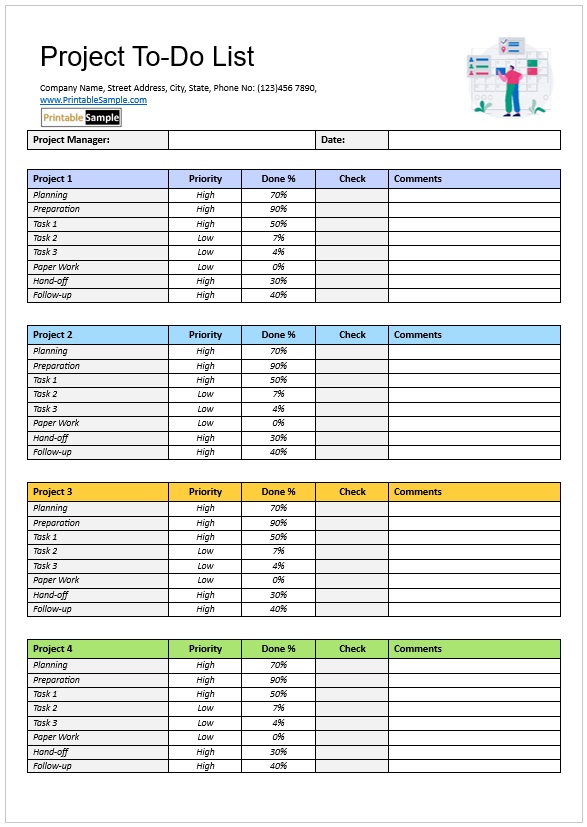
Not all lists are created equal. To move from a basic checklist to a high-performance management tool, your Project Todo List Template must include specific data fields that provide context and clarity. Here are the essential components every comprehensive template should feature:
- Task ID/Reference Number: A unique identifier for each task. This is crucial for referencing specific items in emails or meeting notes without typing out long task names.
- Task Description (The “What”): A clear, verb-led action statement (e.g., “Draft Q3 Budget Proposal” instead of just “Budget”).
- Priority Level (High/Medium/Low): A categorization tool to ensure the team tackles the “big rocks” before the “sand.” This prevents the common mistake of completing easy, low-value tasks while the critical path remains blocked.
- Assignee/Owner: A single point of accountability. If two people are assigned to one task, often neither takes full ownership.
- Start and Due Dates: Hard deadlines are non-negotiable. Including a start date helps in visualizing the workload distribution over the project lifecycle.
- Status Indicator: A dynamic field (e.g., To Do, In Progress, Under Review, Completed) that provides an instant snapshot of project health.
- Dependencies: A note indicating if a task cannot start until another is finished (e.g., “Cannot start Website Coding until UI Design is approved”).
- Estimated vs. Actual Effort: Columns to track how many hours were budgeted versus how many were spent, which is essential for future project estimation.
Step-by-Step Guide: How to Customize and Use Your Template
Simply downloading a Project Todo List Template is only 10% of the battle. The real magic happens in the implementation. Follow this professional workflow to ensure your template drives actual results:
- The Brain Dump (Ideation): Start by listing every single action item required to reach the project goal. Don’t worry about order or priority yet; just get every requirement out of your head and into the template.
- Decomposition (Breaking it Down): Review your list. If a task feels “too big” (e.g., “Build Website”), break it into sub-tasks (e.g., “Register Domain,” “Create Sitemap,” “Draft Homepage Copy”). A task should ideally be something that can be completed in 1–4 hours.
- Categorization and Sequencing: Assign your priority levels and set the dependencies. Determine the “Critical Path”—the sequence of tasks that must be completed on time for the project to meet its final deadline.
- Resource Allocation: Assign owners based on skill set and current bandwidth. Ensure no single team member is a bottleneck by overloading their section of the list.
- The Rhythm of Review: A template is a living document, not a static file. Establish a “Review Cadence.” This could be a daily 15-minute stand-up or a weekly synchronization meeting where the status of each item in the Project Todo List Template is updated and blockers are identified.
- Closing the Loop: When a task is marked “Completed,” archive it or move it to a “Done” tab. This provides a psychological win for the team and a clear record of progress.
Download Free Project Todo List Template

Best Practices & Common Mistakes to Avoid
To maximize the efficiency of your Project Todo List Template, consider these expert tips:
Pro-Tip: Leverage Automation. If you are using a digital template (Excel, Google Sheets, Notion, or Monday.com), use conditional formatting. Set your “Due Date” column to turn red if the date has passed and the status is not “Completed.” This creates an immediate visual alert for urgency.
Avoid the “Kitchen Sink” Pitfall. One of the most common mistakes is overcomplicating the template with too many columns. If your team spends more time updating the tracker than doing the work, you have built a bureaucratic hurdle, not a tool. Keep it lean—only track what you actually intend to measure.
Avoid “Vague-Tasking.” Never allow a task to be listed as “Research” or “Planning.” These are activities, not outcomes. Instead, use “Research 3 Vendor Options” or “Complete Project Plan Document.”
Frequently Asked Questions About Project Todo Lists
What is the difference between a project todo list and a Gantt chart?
A Gantt chart is a high-level visual timeline used for scheduling and seeing how tasks overlap over months. A Project Todo List Template is a granular, execution-focused tool used for daily and weekly management. Most successful managers use both: the Gantt chart for the “Big Picture” and the Todo List for the “Daily Grind.”
Can I use a Project Todo List Template for solo projects?
Absolutely. In fact, solo entrepreneurs often benefit most from templates because they lack a manager to hold them accountable. Using a formal template forces you to act as both the “Manager” (planning the list) and the “Maker” (executing the list), which reduces procrastination and increases focus.
How often should I update my project todo list?
For high-velocity projects, updates should happen daily. For longer-term strategic goals, a weekly update is sufficient. The key is consistency; if a template is only updated once a month, it becomes a historical record rather than a management tool.
Which software is best for a digital Project Todo List Template?
The “best” software depends on your complexity. For simple projects, Google Sheets or Excel is unbeatable for flexibility. For collaborative team environments, tools like Trello, Asana, or Notion provide built-in template structures that allow for drag-and-drop status changes and automated notifications.
Conclusion & Next Steps
Chaos is the default state of any project; order is something you must intentionally build. By implementing a comprehensive Project Todo List Template, you replace guesswork with precision and anxiety with action. Don’t let your next big idea get lost in a sea of sticky notes—start building your structured task list today and reclaim control over your productivity.