We have all been there: Sunday night arrives with a wave of anxiety because the coming week feels like an insurmountable mountain of obligations. You have a vague idea of what needs to be done, but without a concrete plan, you spend your Monday morning reacting to emergencies rather than executing goals. This is where a weekly todo list template transforms from a simple piece of paper into a strategic asset. By shifting from a chaotic “mental list” to a structured visual framework, you stop managing your time and start managing your energy and priorities, ensuring that high-impact tasks never slip through the cracks.
The Psychology of Planning: Why a Weekly Todo List Template is Non-Negotiable
Most people rely on daily to-do lists, but the daily approach is fundamentally flawed. It creates a “tunnel vision” effect where you only see the immediate 24 hours, often neglecting long-term projects or failing to account for the natural ebb and flow of a work week. A comprehensive weekly to do list template provides a “macro-view,” allowing you to balance heavy workloads with necessary downtime.
The hidden value of this document lies in the reduction of cognitive load. When you externalize your tasks into a structured template, your brain no longer has to expend energy remembering what to do; it can focus entirely on how to do it. This shift significantly reduces decision fatigue and anxiety.
Furthermore, a weekly framework introduces accountability. When you map out your week, you can realistically assess your capacity. Without it, the risk is “over-planning”—scheduling 15 hours of work into an 8-hour day—which leads to burnout and a sense of failure when the list remains unchecked. By utilizing a template, you create an audit trail of your productivity, allowing you to identify patterns in your procrastination and optimize your workflow over time.
Anatomy of a Perfect Weekly Todo List Template
Not all templates are created equal. A basic checklist is rarely enough for a high-performer. To truly drive results, your weekly todo list template should be composed of several strategic zones that categorize information by urgency and intent.
- The “Big Three” (Primary Objectives): A dedicated section at the top for the three non-negotiable goals for the week. If nothing else gets done, these must be completed to consider the week a success.
- Daily Breakdown Columns: Seven distinct sections (Monday through Sunday) to distribute tasks. This prevents “Monday Overload” and ensures a balanced distribution of labor.
- The “Brain Dump” or Inbox Area: A flexible space to jot down random tasks, ideas, or requests that arrive mid-week. This keeps you from getting distracted by new tasks while working on current ones.
- Priority Matrix (High/Medium/Low): A coding system or column that assigns a priority level to each task, helping you decide what to delegate or delete if time runs short.
- Habit Tracker Integration: Small checkboxes for recurring daily wins (e.g., “Workout,” “Read 20 mins,” “Deep Work Block”) to maintain consistency alongside your task list.
- Weekly Review/Reflection Section: A bottom area to note what went well and what needs to be migrated to next week’s list.
Download Free Weekly Todo List Template
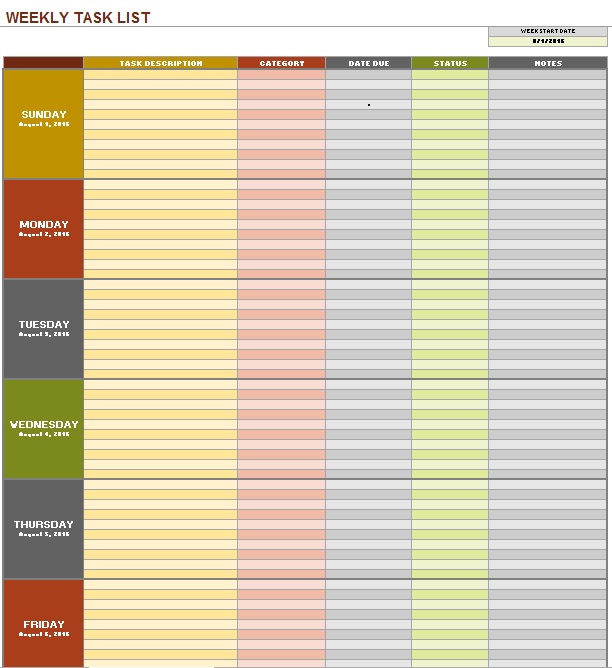

Step-by-Step Guide: How to Customize and Implement Your Template
Having a weekly todo list template is only half the battle; the magic happens in the execution. Follow this chronological workflow to turn your template into a productivity engine.
Step 1: The Sunday Setup (The Planning Phase)
Spend 20 minutes every Sunday evening or Monday morning filling out your template. Start with your “Big Three.” Look at your calendar for appointments and deadlines, then slot those fixed-time events into the daily columns first. This reveals your actual “white space”—the time you truly have available for tasks.
Step 2: Strategic Distribution
Avoid the temptation to fill every day to capacity. Instead, group similar tasks together (Task Batching). For example, dedicate Tuesday afternoon to “Administrative Tasks” (emails, invoicing, filing) and Wednesday morning to “Deep Work” (writing, coding, strategizing). This minimizes the mental cost of switching between different types of cognitive effort.
Step 3: The Daily Pivot
Each morning, review your weekly template and highlight the specific tasks for that day. Use this moment to adjust based on new priorities. If a crisis emerged on Tuesday, shift your remaining tasks to Wednesday or Thursday. The template is a living document, not a rigid contract.
Step 4: The Friday Closing
Before signing off for the week, conduct a “Weekly Review.” Check off completed items and physically migrate incomplete tasks to the following week’s template. This prevents tasks from disappearing into a void and provides a psychological sense of closure.
Best Practices and Common Pitfalls to Avoid
To maximize the efficiency of your weekly todo list template, consider these professional insights:
Pro Tip: Go Hybrid. While digital tools like Notion or Trello are excellent for collaboration, the physical act of writing on a printable template engages the brain differently and increases commitment. Consider a digital master list and a printed weekly sheet on your desk for immediate visibility.
Avoid the “Over-Listing” Trap: The biggest mistake users make is treating their to-do list as a “wish list.” If your template has 40 items for a single week, you aren’t planning; you’re daydreaming. Be ruthless. If a task doesn’t align with your goals or deadlines, move it to a “Someday/Maybe” list.
Avoid Over-Complication: Do not spend more time decorating your template than actually doing the work. A high-functioning template should be intuitive and fast to fill. If the system feels like a chore, you will abandon it within two weeks.
Frequently Asked Questions About Weekly To Do List Templates
What is the difference between a daily and a weekly to do list template?
A daily list is tactical and focuses on immediate execution, while a weekly to do list template is strategic. The weekly version allows you to see the “big picture,” balance your workload across several days, and ensure that long-term projects are receiving incremental progress rather than being ignored until a deadline looms.
Should I use a digital or a printable weekly todo list template?
It depends on your workflow. Digital templates are superior for those who need to sync across devices, collaborate with a team, or manage a high volume of links and files. Printable templates are better for those who struggle with digital distractions and prefer the tactile satisfaction of crossing off a task with a pen, which triggers a dopamine release and boosts motivation.
How do I handle tasks that take longer than expected?
The best way to manage this within your template is through “buffer blocking.” Leave at least 20% of your daily columns empty. When a task overflows, it consumes the buffer rather than pushing every other task in your week forward, which prevents the “domino effect” of scheduling failure.
What should I do if I consistently fail to finish my weekly list?
This is usually a sign of “Planning Fallacy”—underestimating how long a task takes. Review your completed tasks from the last month. If you consistently only finish 60% of your list, reduce your planned tasks by 40% for the next week. Accuracy in planning is more valuable than an ambitious but unfinished list.
Conclusion: Start Your Path to Organized Success
A weekly todo list template is more than just an organizational tool; it is a commitment to your future self that you will operate with intention rather than urgency. By structuring your objectives, allocating your time realistically, and reviewing your progress, you reclaim control over your schedule. Stop reacting to your life and start designing it—download or create your template today and experience the clarity of a planned week.