In the fast-paced world of manufacturing, content creation, and product development, the difference between a profitable quarter and a logistical nightmare often comes down to one thing: timing. Whether you are managing a factory floor, a film set, or a digital marketing agency, the ability to visualize when tasks start, who is responsible for them, and when the final product reaches the customer is critical.
This is where a **production schedule template** becomes an indispensable asset. Rather than staring at a blank spreadsheet and hoping for the best, a structured template provides a roadmap for operational efficiency. It transforms a chaotic list of “to-dos” into a synchronized timeline, ensuring that resources are allocated correctly and deadlines are met without burning out your team.
What Is a Production Schedule Template?
A production schedule template is a pre-formatted document—typically created in Excel, Google Sheets, or specialized project management software—designed to map out the entire lifecycle of a product’s creation. It serves as a visual and chronological blueprint that outlines every phase of production, from the initial raw material acquisition to the final quality assurance check and shipping.
Unlike a simple calendar, a production schedule is a dynamic tool. It accounts for dependencies (tasks that cannot start until another is finished), lead times (the time it takes for materials to arrive), and capacity constraints (how much work your team or machinery can actually handle). By using a template, managers can standardize how data is entered and viewed, allowing for quick adjustments when unexpected delays occur.
Purpose and Importance
The primary purpose of a production schedule is to eliminate ambiguity. In any production environment, “guessing” leads to waste. When a team lacks a centralized schedule, you encounter “bottlenecks”—situations where one department is overwhelmed while another sits idle because they haven’t received the necessary components.
The importance of this document manifests in three key areas:
1. Resource Optimization: It prevents the over-allocation of labor and machinery. By seeing the schedule at a glance, a manager can see if a specific machine is booked for 24 hours straight, signaling the need for maintenance or additional staffing.
2. Predictable Delivery Dates: Customers demand accuracy. A production schedule allows a business to provide a realistic “Promise Date” based on current capacity and historical lead times, rather than an optimistic guess.
3. Waste Reduction: In Lean Manufacturing, “waiting” is considered one of the eight wastes of production. A well-implemented schedule reduces idle time and minimizes the accumulation of Work-in-Process (WIP) inventory.
Key Elements Included
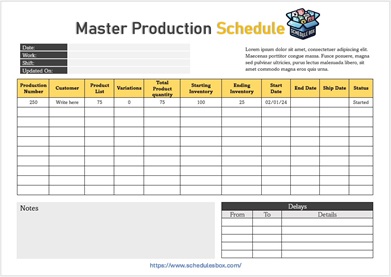
A professional production schedule template is more than just a list of dates. To be effective, it should include the following critical data points:
- Job/Order ID: A unique identifier for each project or batch to ensure tracking accuracy.
- Product Specifications: A brief description of what is being produced, including SKU numbers or version codes.
- Start and End Dates: Clear timestamps for when a task should begin and when it must be completed.
- Task Dependencies: Indicators showing which tasks are “blockers” (e.g., you cannot paint a part until the sanding phase is complete).
- Resource Allocation: Identification of the specific machine, workstation, or employee assigned to the task.
- Quantity/Volume: The number of units being produced in that specific run.
- Status Indicators: Visual cues (often color-coded) showing whether a task is “Not Started,” “In Progress,” “Delayed,” or “Complete.”
- Lead Time Buffers: Small windows of “slack time” built into the schedule to account for unforeseen errors or shipping delays.
Download Free Production Schedule Template

Benefits of Using a Template
Starting from scratch every time you plan a production run is a waste of administrative energy. Utilizing a standardized template offers several strategic advantages:
Time Savings
Setting up a production plan manually can take hours of formatting. A template allows you to simply plug in the variables—dates, quantities, and names—reducing the planning phase from hours to minutes.
Accuracy and Precision
Templates reduce the risk of human error. When a template includes pre-set formulas (such as calculating total lead time based on individual task durations), it eliminates the mathematical mistakes that often lead to missed deadlines.
Professional Appearance
For businesses that share their production timelines with stakeholders or clients, a clean, formatted template conveys competence and reliability. It demonstrates that the company has a controlled, professional process in place.
Consistency Across Teams
When every department uses the same production schedule template, communication improves. The procurement team, the floor manager, and the shipping department all speak the same “visual language,” reducing misunderstandings.
Better Record Keeping
Templates act as a historical archive. By saving a copy of the schedule for every project, a company can analyze past performance to see where delays typically happen and refine their future estimates.
Who Can Use This Template?
While the term “production” often evokes images of heavy machinery, a production schedule template is versatile and applicable across various industries:
- Manufacturing Plants: From automotive parts to textiles, factories use these templates to manage assembly lines and batch processing.
- Content Creators & Digital Agencies: Video production houses use them to track scripting, filming, editing, and rendering phases.
- Print Shops & Signage Companies: Managing the flow from graphic design to printing, cutting, and installation.
- Bakery and Food Production: Planning the timing of dough proofing, baking, and packaging to ensure freshness.
- Software Development: Using a modified production schedule (often integrated into an Agile or Scrum framework) to track sprint cycles and release dates.
- Event Planners: Scheduling the “production” of an event, from vendor load-in to the final curtain call.
How to Customize the Template
To get the most out of a production schedule template, you must tailor it to your specific operational needs. Follow these steps for effective customization:
- Define Your Columns: If you are in a highly regulated industry, add a “Compliance Check” or “QC Approval” column. If you are in a creative field, add a “Review/Feedback” stage.
- Implement Conditional Formatting: Use colors to signify urgency. For example, set the template to turn a cell red if the current date passes the “End Date” without the status being marked as “Complete.”
- Set Up Drop-Down Menus: To maintain data integrity, use drop-down lists for “Employee Names” or “Machine IDs.” This prevents typos and makes sorting and filtering much easier.
- Integrate Formulas: Use simple SUM or NETWORKDAYS formulas to automatically calculate the total duration of a project based on the start and end dates.
- Choose Your View: Decide if you need a **List View** (best for detailed data) or a **Gantt Chart View** (best for visualizing overlapping timelines). Many templates allow you to toggle between these.
Common Mistakes to Avoid
Even with a great template, poor planning can lead to failure. Avoid these common pitfalls:
- Over-Scheduling (The “Perfect World” Fallacy): Scheduling tasks back-to-back with zero gaps. In reality, machines break, employees get sick, and shipments are delayed. Always include a buffer.
- Ignoring Bottlenecks: Scheduling three different jobs to use the same machine at the same time. A template helps you see this, but you must actively manage it.
- Failure to Update in Real-Time: A production schedule is a living document. If a task is delayed by two hours on Monday and you don’t update the template, the errors will compound by Friday.
- Too Much Detail: Adding so many columns and micro-tasks that the document becomes overwhelming. Focus on the “critical path”—the sequence of stages that must be completed on time for the project to finish.
Related Templates and Documents
To build a complete operational ecosystem, consider pairing your production schedule with these other essential documents:
- Inventory Management Template: To ensure you have the raw materials required before the production schedule begins.
- Quality Control (QC) Checklist: To be used at the “Inspection” phase of the production schedule.
- Capacity Planning Worksheet: To determine the maximum amount of work your facility can handle before adding a production schedule.
- Bill of Materials (BOM): A comprehensive list of every part and component needed to manufacture a finished product.
- Maintenance Log: To track machine downtime and ensure it doesn’t conflict with high-priority production runs.
Frequently Asked Questions (FAQ)
1. What is the difference between a project schedule and a production schedule?
A project schedule is typically for a one-time event (like building a house), whereas a production schedule is often for repetitive processes or batches (like manufacturing 500 chairs). Production schedules focus more on throughput, capacity, and cycle times.
2. Can I use a production schedule template for a small business?
Absolutely. Even if you are a solopreneur making handmade jewelry, a production schedule helps you understand how many orders you can realistically accept per week without compromising quality.
3. Which software is best for a production schedule?
For beginners, Excel or Google Sheets are best due to their flexibility and formula capabilities. For larger teams, dedicated tools like Trello, Monday.com, or ClickUp offer more automation and real-time collaboration.
4. How often should I update my production schedule?
Ideally, the schedule should be updated daily. In high-velocity environments, shift supervisors may update the schedule at the start and end of every shift to reflect actual progress.
5. What is a “Lead Time” in a production schedule?
Lead time is the total amount of time that elapses from the moment an order is placed until it is delivered. This includes the time spent waiting for materials, the actual production time, and the shipping time.
6. How do I handle unexpected delays in my template?
The best way is to incorporate “buffer time” into your initial plan. When a delay occurs, shift the subsequent tasks forward and analyze the cause of the delay to adjust your future templates for better accuracy.
Conclusion
Efficiency is not the result of working harder; it is the result of planning smarter. A **production schedule template** is more than just a grid of dates—it is a strategic tool that allows you to visualize your workflow, protect your resources, and guarantee customer satisfaction.
By shifting from a reactive “firefighting” mode to a proactive planned approach, you reduce stress for your team and increase the profitability of your operations. Whether you are managing a complex industrial assembly line or a small-scale creative studio, implementing a structured production schedule is the first step toward scalable, sustainable growth. Download or create your template today and start turning your operational chaos into a streamlined success story.