Managing a workforce requires a delicate balance between maintaining operational productivity and respecting the need for employee rest and recuperation. One of the most challenging aspects of annual administration is coordinating time off during peak seasons. Whether it is the winter holidays, national public holidays, or floating company days, a lack of coordination often leads to understaffing, missed deadlines, and workplace stress.
This is where a holiday schedule template becomes an indispensable tool for HR managers, business owners, and team leads. Rather than relying on fragmented email threads or verbal agreements, a structured template provides a centralized “source of truth” for the entire organization. By visualizing who is away and when, leadership can ensure business continuity while fostering a culture of transparency and fairness regarding leave requests.
What Is a Holiday Schedule Template?
A holiday schedule template is a pre-formatted document—typically created in Excel, Google Sheets, or a specialized HR software—designed to track, organize, and communicate the dates on which a business will be closed or when specific employees will be taking leave. Unlike a standard calendar, a professional holiday schedule template focuses specifically on the intersection of corporate availability and individual time-off requests.
Depending on the organization’s needs, these templates can range from a simple company holiday calendar (listing fixed dates the office is closed) to a complex employee leave tracker (tracking accruals and requested dates for a diverse workforce). The primary goal is to eliminate ambiguity, ensuring that every stakeholder knows exactly which days are non-working and who is available to handle urgent tasks during holiday windows.
Purpose and Importance
The purpose of implementing a formal holiday schedule extends beyond mere date-tracking. It serves as a strategic planning instrument that impacts several areas of business operations:
- Workforce Management: It prevents “skeleton crew” scenarios where too many key personnel are absent simultaneously, which could lead to operational shutdowns or failure to meet client SLAs (Service Level Agreements).
- Employee Wellbeing: When employees know their leave is approved and documented, they can truly disconnect, reducing burnout and improving long-term retention.
- Client Expectations: A clear holiday schedule allows businesses to notify clients in advance of closures, preventing frustration and maintaining a professional image.
- Conflict Resolution: By using a template to track requests on a first-come, first-served or seniority-based system, managers can avoid accusations of favoritism.
- Budgeting and Payroll: For companies that pay holiday premiums or track paid time off (PTO), a structured schedule is essential for accurate payroll processing.
Key Elements Included
To be effective, a holiday schedule template must capture specific data points. Depending on the complexity of your business, your template should include the following sections:
1. Company-Wide Observed Holidays
A list of fixed dates where the entire organization is closed (e.g., New Year’s Day, Independence Day, Christmas). This section often includes a note on whether the office is fully closed or if “essential personnel” are required.
2. Employee Name and Department
Columns dedicated to the employee’s identity and their specific role. This helps managers identify if a specific department (like Accounting or IT) is becoming dangerously understaffed during a specific window.
3. Date Ranges
Clear fields for “Start Date” and “End Date” of the leave, as well as the “Return to Work” date. This eliminates confusion regarding whether an employee is off on a specific date or returning on that date.
4. Leave Category
Distinction between different types of time off, such as:
- Paid Time Off (PTO)
- Unpaid Leave
- Floating Holidays
- Sick Leave/Emergency Leave
5. Approval Status
A tracking column indicating whether the request is Pending, Approved, or Denied. This prevents employees from booking non-refundable travel before official confirmation.
6. Coverage/Backup Personnel
A critical field where the employee lists who will be handling their responsibilities during their absence. This ensures that no project stalls while a team member is away.
What Is a Holiday Schedule Template?
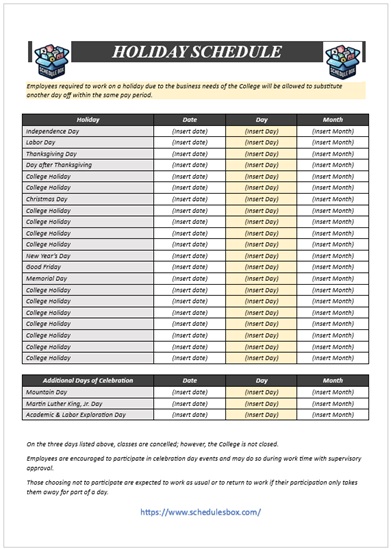
Here is a hand-picked free Schedule Template for your Holiday Planning.

Benefits of Using a Template
While it may be tempting to simply use a group chat or a shared digital calendar, a dedicated template offers several high-level advantages:
- Significant Time Savings: Instead of building a tracker from scratch every year, HR can simply update the dates on a master template, reducing administrative overhead.
- Enhanced Accuracy: Templates reduce the risk of human error. With pre-set formulas (in the case of spreadsheets), you can automatically calculate the total number of days taken.
- Professional Appearance: Presenting a clean, well-organized holiday schedule to the team demonstrates a level of corporate maturity and organization.
- Consistency Across Departments: When every department uses the same holiday schedule template, it is easier for cross-functional teams to coordinate meetings and project milestones.
- Compliance and Audit Trails: In many jurisdictions, tracking leave is a legal requirement. A template provides a paper trail that can be used during audits to prove fair labor practices.
- Improved Visibility: A visual template (such as a Gantt chart style) allows managers to see “clumping”—where too many people want the same week off—at a single glance.
Who Can Use This Template?
The versatility of a holiday schedule makes it useful across various sectors:
- Small Business Owners: To manage a small team where every person’s presence is critical to daily operations.
- Corporate HR Departments: To maintain a master record of company-wide closures and individual PTO usage for thousands of employees.
- Retail and Hospitality Managers: To plan for “peak” and “off-peak” seasons, ensuring maximum staffing during high-revenue holidays and allowing leave during slow periods.
- Educational Institutions: To coordinate faculty breaks, administrative closures, and student holiday windows.
- Freelancers and Agency Owners: To communicate “out of office” periods to clients, ensuring expectations are managed regarding project delivery.
- Medical Practices: To ensure that at least one primary care provider or specialist is available at all times.
How to Customize the Template
Once you have downloaded or selected a holiday schedule template, you should personalize it to fit your unique business culture. Follow these steps for optimal customization:
- Define Your Fiscal Year: Determine if your schedule follows the calendar year (January to December) or a specific fiscal year. Set your date headers accordingly.
- Set Your “Hard” Dates: Enter all non-negotiable company holidays first. Highlight these cells in a different color (e.g., light grey) so they are visually distinct from individual requests.
- Establish a Request Key: Create a legend for the template. For example, use “P” for Paid, “U” for Unpaid, and “S” for Sick leave. This keeps the document clean and easy to read.
- Implement Conditional Formatting: If using Excel or Google Sheets, set up conditional formatting. For instance, make “Approved” cells turn green and “Pending” cells turn yellow.
- Determine Access Levels: Decide who can edit the template. Usually, employees should have “View Only” access to the master schedule, while HR or Managers have “Edit” access to prevent accidental deletions.
- Add a “Notes” Section: Include a space for specific instructions, such as “Emergency contact info required for all leave longer than 5 days.”
Common Mistakes to Avoid
To ensure your holiday planning is seamless, avoid these frequent pitfalls:
- Failure to Set a Deadline: Do not leave the schedule open indefinitely. Establish a “cutoff date” (e.g., November 1st for December holidays) by which all requests must be submitted.
- Overlooking Time Zones: For remote teams, remember that a “National Holiday” in the UK is not a holiday for a team member in the US. Specify the region for each holiday.
- Ignoring “Blackout Dates”: Some industries have periods where leave is prohibited (e.g., accounting firms during tax season). Clearly mark these as “Blackout Dates” on your template to avoid conflict.
- Lack of Communication: A template is only useful if people look at it. Don’t just save it in a folder; link it in the company Slack channel, email signature, or pin it to the company intranet.
- Not Accounting for Travel Days: Some employees may request leave starting on a Friday for a trip that doesn’t officially start until Saturday. Ensure the template tracks the actual days of absence, not just the event date.
Related Templates and Documents
A holiday schedule is often part of a larger ecosystem of administrative documents. You may also find these resources helpful:
- Employee Handbook: Where the official company policy on holiday pay and leave requests is detailed.
- Time-Off Request Form: A formal document that employees submit before the manager adds the dates to the holiday schedule template.
- Shift Rotation Schedule: Useful for businesses that must remain open 24/7 and need to rotate who works the holiday.
- Onboarding Checklist: To introduce new hires to the company holiday calendar during their first week.
- Project Timeline/Gantt Chart: To cross-reference project deadlines with upcoming staff absences.
Frequently Asked Questions (FAQ)
What is the best software to use for a holiday schedule template?
For most small to medium businesses, Microsoft Excel or Google Sheets are the best options because they offer flexibility, easy sharing, and powerful conditional formatting. For larger enterprises, integrated HRMS (Human Resource Management Systems) like BambooHR or Workday provide automated scheduling features.
How do I handle conflicting holiday requests in the template?
The best approach is to establish a clear policy beforehand. Common methods include “First-Come, First-Served,” a rotation system (where those who worked last year’s holiday get priority this year), or a seniority-based system. Document this policy next to your template.
Should I include a “Floating Holiday” in my template?
Yes. Floating holidays allow employees to take a day off for a cultural or religious occasion not covered by official company holidays. Adding a “Floating Holiday” column helps you track how many of these flexible days an employee has remaining.
Can a holiday schedule template be used for remote teams?
Absolutely. In fact, it is more critical for remote teams. Since you cannot “see” who is in the office, a shared digital holiday schedule prevents you from assigning a high-priority task to someone who is currently offline for a public holiday in their country.
How often should the holiday schedule be updated?
The master company holidays should be updated annually. However, the employee-specific leave sections should be updated in real-time as requests are approved to ensure the most accurate view of team availability.
Conclusion
A well-implemented holiday schedule template is more than just a calendar; it is a tool for organizational harmony. By centralizing time-off requests, clarifying company closures, and providing a transparent view of staff availability, you reduce the administrative burden on HR and the stress levels of your employees.
When you move away from chaotic email chains and toward a structured, professional template, you ensure that your business remains productive throughout the year—regardless of the season. Whether you are managing a small boutique team or a large corporate department, investing time in your holiday planning today prevents operational crises tomorrow.