The Deep Dive: Why an Hourly Schedule Template is Your Secret Weapon for Efficiency
At its core, an hourly schedule template is a visual map of your day, broken down into sixty-minute or thirty-minute increments. While it may seem simplistic, the psychological impact of “time blocking” is profound. When you assign a specific task to a specific hour, you eliminate the decision fatigue that occurs when you finish one task and spend ten minutes wondering what to do next.
The hidden value of this document lies in accountability and awareness. Without a structured template, it is easy to let “shallow work”—emails, Slack notifications, and minor administrative tweaks—consume your most productive hours. By utilizing an hourly schedule, you create a visual contract with yourself. If a task isn’t on the schedule, it doesn’t get your attention. Conversely, if a high-priority project is blocked from 9:00 AM to 11:00 AM, you are psychologically primed to protect that window from interruptions.
The risks of avoiding this level of organization are significant. Professionals who lack a structured time map often experience “burnout by fragmentation,” where their energy is scattered across twenty different directions, leading to a feeling of exhaustion without the satisfaction of completion. A structured template provides an audit trail of your productivity, allowing you to analyze where your time actually goes versus where you think it goes, enabling data-driven improvements to your workflow.
Anatomy of a Perfect Hourly Schedule Template
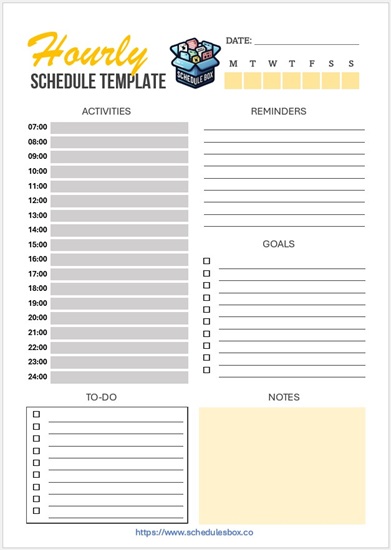
Not all schedules are created equal. A basic grid of lines is a start, but a high-performance hourly schedule template requires specific components to be truly effective. To ensure your template drives results, it should include the following elements:
- The Time Column (The Y-Axis): Clear increments starting from your wake-up time through your wind-down routine. Whether you use 30-minute or 60-minute blocks, the consistency of the intervals is key.
- Priority Focus Zone: A dedicated section at the top for the “Top 3 Non-Negotiables.” This ensures that even if the day becomes chaotic, you know exactly which three tasks must be completed.
- Categorized Time Blocks: The ability to color-code or label blocks. Common categories include Deep Work (high cognitive load), Shallow Work (admin/emails), and Personal Maintenance (meals, exercise, breaks).
- The “Buffer” Zone: Strategically placed empty slots (usually 15–30 minutes) between major tasks. This prevents a single meeting overlap from cascading and ruining the rest of your day.
- Notes and Reflection Area: A space at the bottom to jot down “migrated” tasks—things that didn’t get finished and need to be moved to tomorrow’s hourly schedule template.
- Energy Level Indicators: Some advanced templates include a small icon or color to mark “High Energy” vs. “Low Energy” periods, allowing you to match the difficulty of a task to your biological clock.
Step-by-Step Guide: How to Customize and Use Your Template
Simply printing a template is not enough; the magic happens in the implementation. Follow this professional workflow to integrate an hourly schedule template into your daily routine:
- The Night-Before Brain Dump: Never start your scheduling on the morning of the day. Spend 10 minutes every evening listing every task you need to accomplish the next day. This clears your mental RAM and allows for a restful sleep.
- Prioritize via the Eisenhower Matrix: Look at your brain dump and identify what is urgent and important. These tasks get the “Prime Time” slots on your template—usually the first four hours of your workday when cognitive energy is highest.
- Allocate Realistic Time Blocks: Assign each task to a slot. Pro Tip: Use the “1.5x Rule.” If you think a report will take one hour, block out 90 minutes. This accounts for the inevitable friction of technical glitches or brief interruptions.
- Insert “Hard” Constraints First: Fill in your fixed appointments—meetings, doctor visits, or scheduled calls. These are the anchors of your day around which all other “flexible” work must flow.
- Execute and Adapt: Throughout the day, treat your template as a guide, not a prison. If an emergency arises, shift your remaining blocks downward. The goal is not perfection, but the conscious reallocation of time.
- The End-of-Day Review: Cross off completed items and circle the ones you missed. This visual feedback loop is essential for refining your time-estimation skills over time.
Download this Free Hourly Schedule Template

Best Practices & Common Mistakes to Avoid
To maximize the efficiency of your hourly schedule template, keep these professional tips in mind:
The Pro-Tips: If you prefer digital agility, use a tool like Google Calendar or Notion to create a digital version of your template. This allows for easy “dragging and dropping” of blocks. However, if you struggle with digital distractions, a physical printed template acts as a powerful psychological anchor that keeps you off your device.
Common Pitfalls: The most frequent mistake is over-scheduling. When every minute is accounted for, a single five-minute delay creates a domino effect of stress. Avoid “Tetris Scheduling”—the act of packing blocks so tightly that there is no room to breathe. Remember, white space on your schedule is not wasted time; it is the “margin” that allows you to handle the unexpected without panic.
Frequently Asked Questions About Hourly Schedules
How is an hourly schedule template different from a regular to-do list?
A to-do list is a wish list of tasks, whereas an hourly schedule template is a commitment of time. To-do lists often lead to “over-planning,” where you list 20 items but only have time for five. A template forces you to confront the physical reality of the 24-hour day, ensuring you only commit to what is actually achievable.
Can I use an hourly schedule template for personal use, or is it only for work?
Absolutely. In fact, using an hourly schedule template for personal life—such as meal prep, workout windows, and reading time—is the best way to ensure your personal wellbeing doesn’t get pushed aside by professional demands. It helps create a “hard stop” to the workday, improving work-life balance.
What do I do when my schedule completely falls apart due to an emergency?
Do not abandon the template. Instead, perform a “mid-day reset.” Take two minutes to look at your remaining hours and aggressively prune your list. Move low-priority tasks to tomorrow and re-block the remaining time for the most critical remaining item. The template is a tool for navigation, and when you get off course, you use it to recalculate your route.
Is it better to use a 30-minute or 60-minute interval?
This depends on the nature of your work. If you are an executive with many short meetings, 30-minute increments are essential. If you are a writer, coder, or analyst performing “Deep Work,” 60-minute or even 90-minute blocks are superior, as they reduce the frequency of transitions and allow for a state of “flow.”
Conclusion: Start Reclaiming Your Time Today
An hourly schedule template is more than a productivity hack; it is a boundary-setting tool that protects your most valuable asset: your time. By transitioning from a reactive state to a proactive, planned state, you reduce stress and amplify your output. Don’t let another day slip away into a blur of busy-work. Download or draw your template, block your priorities, and take total control of your day right now.
“`