We have all experienced the “scheduling nightmare”: the double-booked afternoon, the forgotten client call, or the frantic scramble to remember who is coming in at 2:00 PM. Whether you are a freelance consultant, a healthcare provider, or a small business owner, time is your most valuable non-renewable resource. When your scheduling process is chaotic, you aren’t just losing time—you are losing professional credibility and increasing your stress levels.
An appointment schedule template is more than just a grid of hours and dates; it is a strategic framework for time management. By transitioning from a mental list or a scattered notebook to a structured template, you create a visual map of your availability, ensuring that every minute of your workday is intentional. In this guide, we will explore how to implement a system that eliminates scheduling conflicts and restores your peace of mind.
The Strategic Value of a Structured Appointment Schedule Template
Many professionals mistake a calendar for a schedule. While a calendar tells you when something is, a structured appointment schedule template tells you how your day is balanced. The hidden value of utilizing a formal template lies in its ability to provide an immediate “snapshot” of operational capacity. When you can see your day at a glance, you can identify patterns—such as “mid-day slump” periods where you should avoid complex meetings, or high-traffic windows where you need extra support staff.
Beyond mere organization, these templates serve as a critical tool for accountability and audit trails. In professional services—particularly in medical, legal, or consulting fields—having a documented record of appointments is essential for billing accuracy and compliance. If a dispute arises regarding a missed session or a service delivery time, a well-maintained schedule serves as the primary source of truth.
The risks of ignoring a formalized system are significant. Without a standardized appointment schedule template, businesses often suffer from “leakage”—lost revenue due to gaps in the schedule that could have been filled, or burned-out employees due to back-to-back bookings without transition time. By implementing a structured system, you shift from a reactive state (putting out fires) to a proactive state (managing growth).
Anatomy of a Perfect Appointment Schedule Template
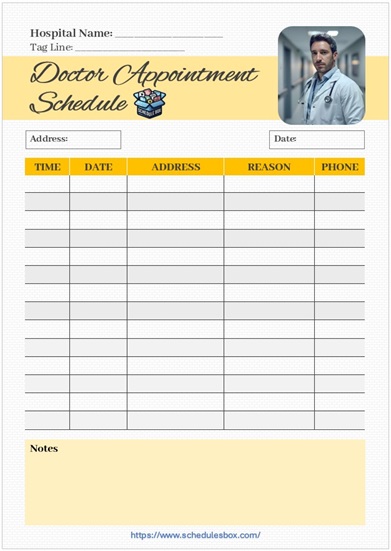
Not all templates are created equal. A generic calendar may suffice for personal errands, but a professional-grade appointment schedule template requires specific data fields to be truly effective. To ensure your template drives efficiency, it must include the following core components:
- Client/Patient Identification: A clear field for the name and contact information of the person being scheduled. This prevents the “Who is this?” panic five minutes before a meeting starts.
- Time Slots & Duration: Precise start and end times. Rather than just listing “2:00 PM,” include the expected duration (e.g., 30 min, 60 min) to help you visualize the gaps between appointments.
- Service Category/Purpose: A column to specify the type of appointment (e.g., “Initial Consultation,” “Follow-up,” “Technical Review”). This allows you to prepare the necessary materials in advance.
- Contact Method/Location: In a hybrid world, you must specify if the appointment is In-Person (with a room number), via Zoom/Teams, or a Phone Call.
- Status Tracking: A way to mark the appointment as “Confirmed,” “Pending,” “Completed,” or “Cancelled.” This is vital for managing your daily workflow.
- Buffer Time/Notes: A dedicated space for brief notes (e.g., “Client prefers morning slots”) and an intentional gap between entries to allow for mental resets or administrative cleanup.
- Staff Assignment: If you have a team, a field indicating which specialist is handling the appointment to avoid resource conflicts.
Step-by-Step Guide: How to Customize and Use Your Template
Simply downloading a document isn’t enough; you need a repeatable workflow to ensure the appointment schedule template actually saves you time. Follow this chronological breakdown to implement your system:
Step 1: Define Your “Ideal Day” Parameters
Before filling in names, set your boundaries. Determine your “hard start” and “hard stop” times. Allocate non-negotiable blocks for administrative work, lunch, and deep-focus tasks. This ensures you don’t overbook yourself into a state of exhaustion.
Step 2: Standardize Your Time Blocks
Avoid arbitrary timing (e.g., one meeting at 2:05 and another at 2:20). Use standard increments—15, 30, or 60 minutes. This makes your appointment schedule template easier to read and allows you to spot open slots instantly.
Step 3: The Input Process
Designate one person (or one software tool) as the “Gatekeeper.” Whether it is a receptionist or a digital booking link, all requests must flow through the same entry point into the template. This prevents the double-booking that occurs when appointments are accepted via multiple channels (email, text, and phone).
Step 4: Daily Review and Preparation
At the end of each workday, review the template for the following day. Cross-reference your “Service Category” column to gather the documents or tools needed for tomorrow’s clients. This 10-minute habit eliminates morning anxiety.
Step 5: Post-Appointment Archiving
Once an appointment is complete, update the “Status” field. If you are using a digital template, move the completed entry to an archive log. This keeps your active schedule clean and provides a historical record for future billing or reviews.
Download Free Appointment Schedule Template

Best Practices and Common Mistakes to Avoid
To get the most out of your appointment schedule template, consider these expert tips for optimization:
The Power of the “Buffer”: Never schedule appointments back-to-back. A common mistake is the “Tetris Approach,” where you try to fit every block perfectly. In reality, meetings often run long. Always leave a 5-to-15 minute buffer to allow for a restroom break, a quick note-take, or a late arrival.
Digital Automation vs. Manual Entry: While printable PDF templates are great for those who prefer tactile organization, consider a cloud-based spreadsheet or scheduling software. Automation allows for real-time updates and automatic reminders to clients, which drastically reduces “no-show” rates.
Avoid Over-Engineering: Don’t add 20 columns of data if you only need five. The more complex a template is to fill out, the less likely you are to maintain it consistently. Keep it lean and focused on the data that actually impacts your day.
Frequently Asked Questions about Appointment Scheduling
What is the difference between an appointment schedule and a calendar?
A calendar is a general tool for tracking dates and deadlines over a long period. An appointment schedule template is a specialized tool designed for managing specific time-slots and resource allocations within a day or week. While a calendar tells you that “Tuesday is busy,” a schedule template tells you exactly who is occupying which 30-minute window and what is required for that session.
Can I use an appointment schedule template for a team of multiple people?
Yes, but you must add a “Staff Member” or “Resource” column. When managing a team, the template evolves into a resource management tool. It is critical to ensure that you are not only tracking the client’s time but also the availability of the specific room or piece of equipment needed for that appointment.
How do I reduce “no-shows” using my scheduling system?
The template is your foundation, but the communication is the bridge. Use the contact information in your template to send a “Confirmation Request” 24 hours before the appointment. By linking your template to a reminder system (manual or automated), you significantly increase the likelihood of client attendance.
Is a digital template better than a printable one?
It depends on your workflow. Printable templates are excellent for those who want a distraction-free environment or for offices where a physical clipboard is the fastest way to check a guest in. However, digital templates offer searchability, easy editing, and cloud backup, making them superior for scaling businesses and remote work.
Conclusion: Take Control of Your Time Today
Chaos in your calendar leads to chaos in your business. By implementing a professional appointment schedule template, you move from a state of reactivity to a position of total control. Whether you choose a high-tech digital solution or a classic printable log, the key is consistency. Stop guessing your availability and start managing it—download or build your template today and reclaim your workday.